What Is an Hours to Decimal Calculator?
An hours to decimal calculator is a tool that converts a time value expressed in hours and minutes — or hours, minutes, and seconds — into a single decimal number representing the equivalent in decimal hours. It is the essential bridge between how time is naturally recorded (7 hours 30 minutes) and how it must be expressed for payroll processing, billing calculations, project costing, and any arithmetic that involves multiplying time by a rate.
The distinction matters more than most people realize. When a payroll clerk enters 7:30 into a spreadsheet and multiplies it by a $25.00 hourly rate, the arithmetic returns $187.50 — but only if 7:30 has been correctly converted to 7.5 decimal hours first. Without the conversion, 7 hours 30 minutes treated as 7.30 hours produces $182.50, an underpayment of $5.00 per shift. Across a workforce of 200 employees working 250 days per year, that single misunderstanding amounts to $250,000 in annual wage discrepancies.
An hours to decimal calculator eliminates that error entirely by automating the conversion with a formula that never varies and never makes arithmetic mistakes.
Hours to Decimal vs. Time to Decimal: Is There a Difference?
The terms “hours to decimal calculator” and “time to decimal calculator” refer to the same conversion and are used interchangeably across payroll platforms, HR software, and time tracking tools. Both describe converting a duration expressed in the hours:minutes format into a decimal number where the fractional part represents a proportion of one full hour — not one full day and not one hundred minutes.
The only meaningful distinction some tools draw is between:
- Hours and minutes to decimal — the most common use case (converting 8:45 to 8.75)
- Hours, minutes, and seconds to decimal — used in legal billing, scientific measurement, athletic timing, and broadcasting where seconds matter
Both use the same underlying formula, extended by one additional step for seconds.
The Hours to Decimal Formula
The formula is consistent, universal, and mathematically simple:
Standard Formula (Hours and Minutes)
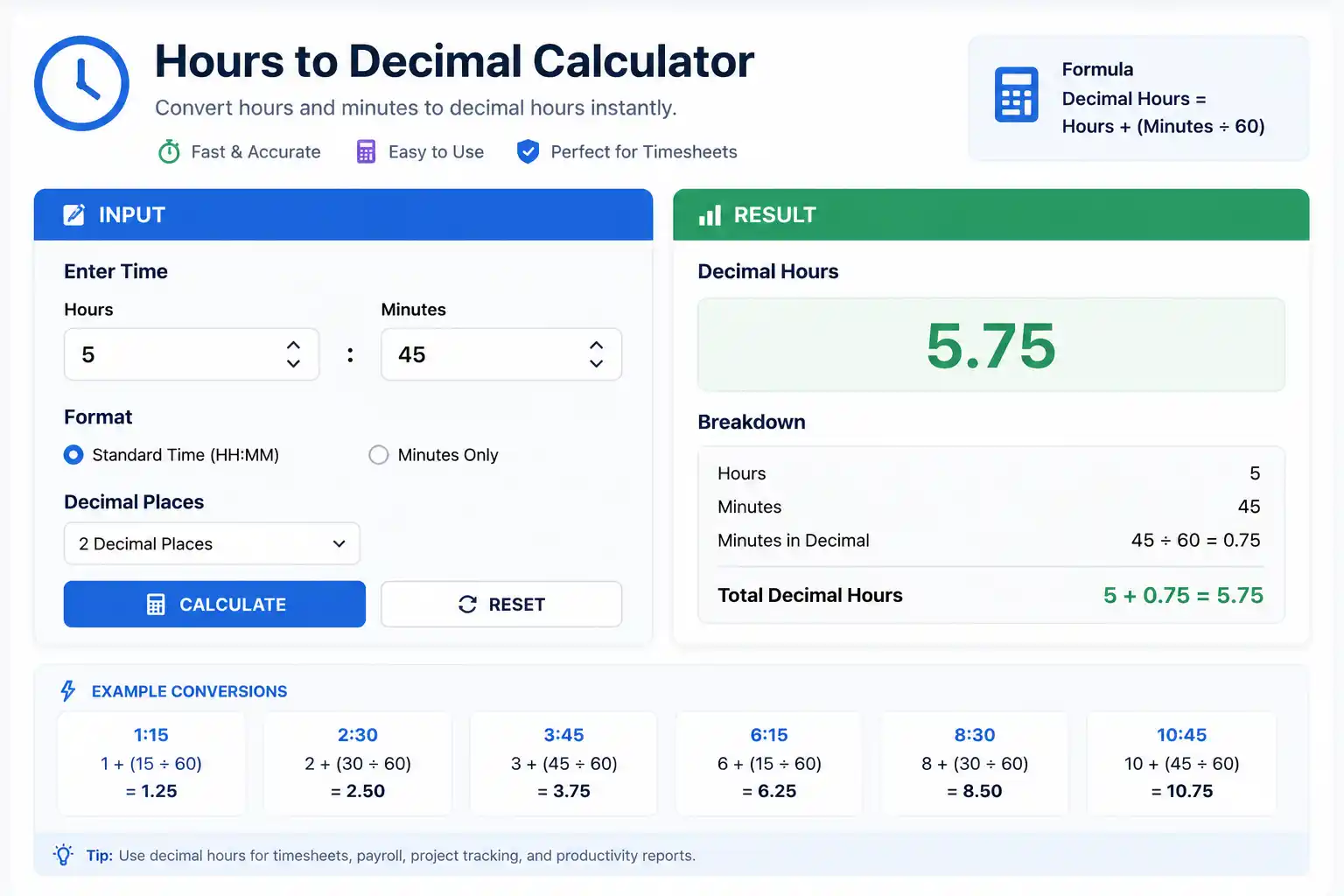
Decimal Hours = Hours + (Minutes ÷ 60)
The hours component is unchanged. The minutes component is divided by 60 — the number of minutes in one hour — converting the sexagesimal minutes value into a base-10 decimal fraction of an hour.
Extended Formula (Hours, Minutes, and Seconds)
Decimal Hours = Hours + (Minutes ÷ 60) + (Seconds ÷ 3600)
Seconds are divided by 3,600 because one hour contains 3,600 seconds (60 minutes × 60 seconds per minute).
Reverse Formula: Decimal Hours Back to Hours and Minutes
Hours = FLOOR(Decimal Hours)              [the whole number part]
Minutes = ROUND((Decimal Hours − Hours) × 60, 0)
Example:
9.417 decimal hours
Hours = 9
Minutes = (9.417 − 9) × 60 = 0.417 × 60 = 25.02 ≈ 25 minutes
Result: 9 hours 25 minutes ✓
Step-by-Step Conversion Examples
Example 1: Basic Hours and Minutes Conversions
| Hours:Minutes | Formula | Decimal Hours |
|---|---|---|
| 0:06 | 0 + (6 ÷ 60) | 0.10 |
| 0:10 | 0 + (10 ÷ 60) | 0.167 |
| 0:15 | 0 + (15 ÷ 60) | 0.25 |
| 0:20 | 0 + (20 ÷ 60) | 0.333 |
| 0:30 | 0 + (30 ÷ 60) | 0.50 |
| 0:45 | 0 + (45 ÷ 60) | 0.75 |
| 1:00 | 1 + (0 ÷ 60) | 1.00 |
| 1:15 | 1 + (15 ÷ 60) | 1.25 |
| 1:30 | 1 + (30 ÷ 60) | 1.50 |
| 2:20 | 2 + (20 ÷ 60) | 2.333 |
| 3:45 | 3 + (45 ÷ 60) | 3.75 |
| 5:10 | 5 + (10 ÷ 60) | 5.167 |
| 6:40 | 6 + (40 ÷ 60) | 6.667 |
| 7:30 | 7 + (30 ÷ 60) | 7.50 |
| 8:15 | 8 + (15 ÷ 60) | 8.25 |
| 8:45 | 8 + (45 ÷ 60) | 8.75 |
| 9:20 | 9 + (20 ÷ 60) | 9.333 |
| 10:50 | 10 + (50 ÷ 60) | 10.833 |
| 11:12 | 11 + (12 ÷ 60) | 11.20 |
| 12:00 | 12 + (0 ÷ 60) | 12.00 |
Example 2: Converting with Seconds
A freelance video editor logs 3 hours, 22 minutes, and 30 seconds of billable work.
Decimal Hours = 3 + (22 ÷ 60) + (30 ÷ 3600)
             = 3 + 0.3667 + 0.0083
             = 3.375 decimal hours
At a billing rate of $90.00/hour:
Invoice = 3.375 × $90.00 = $303.75
Without the seconds component (using 3.3667 hours):
Invoice = 3.367 × $90.00 = $303.03
The 30-second difference costs $0.72 — small per instance but significant across hundreds of client matters per year.
Example 3: Full Weekly Payroll Conversion
Employee: Marcus Webb, HVAC Technician Hourly Rate: $32.50 Unpaid Break: 30 minutes daily
| Day | Raw Shift | Less Break | Decimal Hours | Calculation |
|---|---|---|---|---|
| Mon | 7h 45m | 7h 15m | 7.25 | 7 + (15 ÷ 60) |
| Tue | 9h 00m | 8h 30m | 8.50 | 8 + (30 ÷ 60) |
| Wed | 8h 30m | 8h 00m | 8.00 | 8 + (0 ÷ 60) |
| Thu | 9h 15m | 8h 45m | 8.75 | 8 + (45 ÷ 60) |
| Fri | 8h 00m | 7h 30m | 7.50 | 7 + (30 ÷ 60) |
| Sat | 5h 30m | 5h 00m | 5.00 | 5 + (0 ÷ 60) |
Total Decimal Hours: 7.25 + 8.50 + 8.00 + 8.75 + 7.50 + 5.00 = 45.00 hours
Overtime: 45.00 − 40 = 5.00 hours OT
- Regular Pay: 40.00 × $32.50 = $1,300.00
- OT Pay: 5.00 × ($32.50 × 1.5) = 5.00 × $48.75 = $243.75
- Gross Weekly Pay: $1,543.75
Complete Hours and Minutes to Decimal Conversion Table
Every minute from 1 to 59, with decimal equivalents to four decimal places:
| Min | Decimal | Min | Decimal | Min | Decimal |
|---|---|---|---|---|---|
| 1 | 0.0167 | 21 | 0.3500 | 41 | 0.6833 |
| 2 | 0.0333 | 22 | 0.3667 | 42 | 0.7000 |
| 3 | 0.0500 | 23 | 0.3833 | 43 | 0.7167 |
| 4 | 0.0667 | 24 | 0.4000 | 44 | 0.7333 |
| 5 | 0.0833 | 25 | 0.4167 | 45 | 0.7500 |
| 6 | 0.1000 | 26 | 0.4333 | 46 | 0.7667 |
| 7 | 0.1167 | 27 | 0.4500 | 47 | 0.7833 |
| 8 | 0.1333 | 28 | 0.4667 | 48 | 0.8000 |
| 9 | 0.1500 | 29 | 0.4833 | 49 | 0.8167 |
| 10 | 0.1667 | 30 | 0.5000 | 50 | 0.8333 |
| 11 | 0.1833 | 31 | 0.5167 | 51 | 0.8500 |
| 12 | 0.2000 | 32 | 0.5333 | 52 | 0.8667 |
| 13 | 0.2167 | 33 | 0.5500 | 53 | 0.8833 |
| 14 | 0.2333 | 34 | 0.5667 | 54 | 0.9000 |
| 15 | 0.2500 | 35 | 0.5833 | 55 | 0.9167 |
| 16 | 0.2667 | 36 | 0.6000 | 56 | 0.9333 |
| 17 | 0.2833 | 37 | 0.6167 | 57 | 0.9500 |
| 18 | 0.3000 | 38 | 0.6333 | 58 | 0.9667 |
| 19 | 0.3167 | 39 | 0.6500 | 59 | 0.9833 |
| 20 | 0.3333 | 40 | 0.6667 | 60 | 1.0000 |
The four anchor values to memorize:
- 15 min = 0.25 (quarter hour)
- 30 min = 0.50 (half hour)
- 45 min = 0.75 (three-quarter hour)
- 20 min = 0.333 (one-third hour)
Hours to Decimal Conversion in Excel and Google Sheets
Excel and Google Sheets store time internally as a fraction of a 24-hour day, not as a fraction of an hour. This single fact is responsible for the majority of spreadsheet-based payroll errors involving time.
Understanding Excel’s Time Storage Model
In Excel, the number 1.0 represents one full day (24 hours). Therefore:
| Time Display | Excel Internal Value | Calculation |
|---|---|---|
| 1:00 (1 hour) | 0.041667 | 1 ÷ 24 |
| 6:00 (6 hours) | 0.250000 | 6 ÷ 24 |
| 8:00 (8 hours) | 0.333333 | 8 ÷ 24 |
| 8:45 (8h 45m) | 0.364583 | 8.75 ÷ 24 |
| 12:00 (12 hours) | 0.500000 | 12 ÷ 24 |
When you see “8:45” in a cell formatted as Time, Excel is actually storing 0.364583. Multiplying 0.364583 by $25.00 yields $9.11 — not $218.75. This is the source of the ×24 correction.
The Essential Conversion Formula
= A1 * 24
This converts Excel’s day-fraction into decimal hours. Applied to 8:45 (stored as 0.364583):
0.364583 × 24 = 8.75 ✓
Full Payroll Calculation Formula
For a row where B2 = Clock In, C2 = Clock Out, D2 = Unpaid break in decimal hours:
= (C2 - B2) * 24 - D2
Example:
- B2 = 8:00 AM (stored as 0.333333)
- C2 = 5:45 PM (stored as 0.739583)
- D2 = 0.5 (30 minutes unpaid break)
= (0.739583 - 0.333333) * 24 - 0.5
= 0.406250 * 24 - 0.5
= 9.75 - 0.5
= 9.25 decimal hours ✓
Manual verification: 8:00 AM to 5:45 PM = 9h 45m. Minus 30-min break = 9h 15m = 9.25 hours ✓
Converting Text-Formatted Time Strings
If time values are stored as text strings like “8:45” rather than Excel time values:
= HOUR(TIMEVALUE(A1)) + MINUTE(TIMEVALUE(A1)) / 60
TIMEVALUE converts the text string to an Excel time serial; HOUR and MINUTE extract the components; dividing minutes by 60 completes the conversion.
Displaying Cumulative Hours Over 24
When summing hours that exceed 24 — such as weekly totals — standard time formatting resets to zero at 24:00. To prevent this, format the sum cell using the custom format [h]:mm, which displays cumulative hours without resetting.
Reverse Conversion: Decimal Hours to h:mm in Excel
= A1 / 24
Format the result cell as [h]:mm. This converts 8.75 back to 8:45, 42.5 back to 42:30, and so on.
Hours to Decimal in Different Billing Contexts
Tenth-of-Hour Billing (Legal and Professional Services)
Many professional service firms bill in tenths of an hour (6-minute increments). The hours-to-decimal conversion table for this system is:
| Minutes Worked | Billable Increment | Decimal Value |
|---|---|---|
| 1–6 min | 0.1 hours | 0.1 |
| 7–12 min | 0.2 hours | 0.2 |
| 13–18 min | 0.3 hours | 0.3 |
| 19–24 min | 0.4 hours | 0.4 |
| 25–30 min | 0.5 hours | 0.5 |
| 31–36 min | 0.6 hours | 0.6 |
| 37–42 min | 0.7 hours | 0.7 |
| 43–48 min | 0.8 hours | 0.8 |
| 49–54 min | 0.9 hours | 0.9 |
| 55–60 min | 1.0 hours | 1.0 |
Note: Legal billing typically rounds up to the next tenth. A 7-minute phone call bills as 0.2 hours, not 0.1.
Quarter-Hour Billing (Consulting, Agency, Trades)
Some firms round to the nearest quarter hour for billing:
| Minutes Worked | Billable Increment | Decimal Value |
|---|---|---|
| 1–7 min | 0.25 hours | 0.25 |
| 8–22 min | 0.25 hours | 0.25 |
| 23–37 min | 0.50 hours | 0.50 |
| 38–52 min | 0.75 hours | 0.75 |
| 53–60 min | 1.00 hours | 1.00 |
Exact Decimal Billing (Freelance and Tech)
Freelancers and software firms that track time to the minute convert to exact decimal hours without rounding. A 47-minute session:
47 ÷ 60 = 0.7833 decimal hours
At $120.00/hour: 0.7833 × $120.00 = $94.00
Platforms like Toggl Track, Harvest, and Clockify automate this conversion and generate invoices directly from logged decimal hours.
Hours to Decimal for Common Payroll Scenarios
Scenario 1: Part-Time Variable Schedule
Employee: Sofia Martins, Part-Time Barista Hourly Rate: $14.50 No unpaid breaks (all shifts under 5 hours)
| Day | Shift | Decimal Hours |
|---|---|---|
| Mon | 3h 20m | 3.333 |
| Wed | 4h 45m | 4.75 |
| Fri | 3h 50m | 3.833 |
| Sun | 5h 10m | 5.167 |
Total: 3.333 + 4.75 + 3.833 + 5.167 = 17.083 hours
Gross Pay: 17.083 × $14.50 = $247.70
Scenario 2: Salaried Non-Exempt Employee with Overtime
Employee: James Okafor, Non-Exempt Project Coordinator Regular Rate: $23.00/hour (based on 40-hour week) Work Week Total: 47 hours 30 minutes
47h 30m = 47 + (30 ÷ 60) = 47.50 decimal hours
Regular hours: 40.00
Overtime hours: 47.50 − 40.00 = 7.50 hours
- Regular Pay: 40.00 × $23.00 = $920.00
- OT Pay: 7.50 × ($23.00 × 1.5) = 7.50 × $34.50 = $258.75
- Gross Pay: $1,178.75
Scenario 3: Multiple Pay Rates in One Week
Employee: Dana Kim, Hospital Nursing Assistant
- 24 hours at Regular Rate: $19.00/hour
- 8 hours at Weekend Differential: $22.00/hour
- 10 hours at Night Differential: $21.50/hour
- Total: 42 hours → 2 hours OT
Blended regular rate for OT:
Total Straight-Time Earnings = (24 × $19.00) + (8 × $22.00) + (10 × $21.50)
                             = $456.00 + $176.00 + $215.00 = $847.00

Blended Rate = $847.00 ÷ 42 hours = $20.167/hour

OT Premium = 0.5 × $20.167 × 2 OT hours = $20.17
Gross Pay: $847.00 + $20.17 = $867.17
Building an Hours to Decimal Calculator
JavaScript Implementation
function hoursToDecimal(hours, minutes, seconds = 0) {
  if (minutes < 0 || minutes >= 60) throw new Error("Minutes must be 0–59");
  if (seconds < 0 || seconds >= 60) throw new Error("Seconds must be 0–59");
  const decimal = hours + (minutes / 60) + (seconds / 3600);
  return Math.round(decimal * 10000) / 10000; // Round to 4 decimal places
}

function decimalToHoursMinutes(decimal) {
  const hours = Math.floor(decimal);
  const minutes = Math.round((decimal - hours) * 60);
  return { hours, minutes, formatted: `${hours}h ${minutes}m` };
}

// Usage
console.log(hoursToDecimal(8, 45));        // 8.75
console.log(hoursToDecimal(7, 30));        // 7.5
console.log(hoursToDecimal(2, 17, 42));    // 2.295
console.log(decimalToHoursMinutes(8.75));  // { hours: 8, minutes: 45, formatted: "8h 45m" }
Python Implementation
def hours_to_decimal(hours, minutes, seconds=0):
    if not (0 <= minutes < 60):
        raise ValueError("Minutes must be between 0 and 59")
    if not (0 <= seconds < 60):
        raise ValueError("Seconds must be between 0 and 59")
    decimal = hours + (minutes / 60) + (seconds / 3600)
    return round(decimal, 4)

def decimal_to_hours_minutes(decimal):
    hours = int(decimal)
    minutes = round((decimal - hours) * 60)
    return f"{hours}h {minutes}m"

# Usage
print(hours_to_decimal(8, 45))         # 8.75
print(hours_to_decimal(7, 30))         # 7.5
print(hours_to_decimal(2, 17, 42))     # 2.295
print(decimal_to_hours_minutes(8.75))  # 8h 45m
Common Mistakes and How to Avoid Them
Mistake 1: Treating Minutes as Hundredths
The most prevalent and costly error: entering 8 hours 45 minutes as 8.45 instead of 8.75.
WRONG: 8h 45m → 8.45 × $25 = $211.25
RIGHT: 8h 45m → 8.75 × $25 = $218.75
Loss per shift: $7.50
Annual loss (250 shifts): $1,875.00
Mistake 2: Forgetting the ×24 in Excel
WRONG: =B1 * HourlyRate       (uses day fraction, not decimal hours)
RIGHT: =B1 * 24 * HourlyRate  (converts to decimal hours first)
Mistake 3: Summing Hours:Minutes as Decimals Without Converting
Adding 7:30 + 8:45 as 7.30 + 8.45 = 15.75 is wrong. The correct steps:
7:30 = 7.50 decimal hours
8:45 = 8.75 decimal hours
Total = 7.50 + 8.75 = 16.25 decimal hours (not 15.75)
The difference of 0.5 hours × $25/hr = $12.50 underpayment from a single addition error.
Mistake 4: Rounding Too Early
Rounding 8h 47m to 8h 45m before converting introduces unnecessary error. Always convert the exact minutes:
8h 47m = 8 + (47 ÷ 60) = 8.7833 hours
8h 45m = 8 + (45 ÷ 60) = 8.7500 hours
Difference: 0.0333 hours × $25/hr = $0.83 per shift
Mistake 5: Confusing Duration with Time of Day
8.75 is a decimal duration (8 hours 45 minutes of elapsed time), not a time of day. 8.75 on the clock does not exist; 8:45 AM does. Decimal hours express how long, not when.
Frequently Asked Questions
How do you convert hours and minutes to decimal?
Add the whole hours to the minutes divided by 60. For example: 7 hours 30 minutes = 7 + (30 ÷ 60) = 7.5 decimal hours.
What is 8 hours 45 minutes as a decimal?
8 hours 45 minutes = 8 + (45 ÷ 60) = 8.75 decimal hours.
What is 7 hours 20 minutes as a decimal?
7 hours 20 minutes = 7 + (20 ÷ 60) = 7.333 decimal hours (or 7.33 rounded to two decimal places).
What is 6 hours 15 minutes as a decimal?
6 hours 15 minutes = 6 + (15 ÷ 60) = 6.25 decimal hours.
What is 9 hours 30 minutes as a decimal?
9 hours 30 minutes = 9 + (30 ÷ 60) = 9.5 decimal hours.
How do I convert decimal hours back to hours and minutes?
Take the whole number as hours. Multiply the decimal part by 60 to get minutes. For example: 8.75 → 8 hours and (0.75 × 60) = 45 minutes → 8 hours 45 minutes.
Why does payroll use decimal hours?
Because standard base-10 arithmetic cannot correctly process the hours:minutes format. Multiplying 8:45 directly by an hourly rate produces an incorrect result. Converting to 8.75 first allows multiplication to work correctly.
How do I use hours to decimal in Excel?
If your time is stored as an Excel time value (formatted as h:mm), multiply by 24 to convert to decimal hours: =A124. Then multiply by the hourly rate: =A124*HourlyRate.
What is 30 minutes as a decimal?
30 minutes = 30 ÷ 60 = 0.5 decimal hours.
What is 1 hour 45 minutes as a decimal?
1 hour 45 minutes = 1 + (45 ÷ 60) = 1.75 decimal hours.
Conclusion
The hours to decimal calculator performs one of the most important and most frequently mishandled conversions in business: translating the human experience of time into the mathematical format that makes accurate compensation and billing possible.
The formula is fixed and simple — hours plus minutes divided by 60 — but mastery goes deeper than memorizing it. It means understanding why the conversion is necessary (the incompatibility of sexagesimal and decimal systems), knowing where errors commonly occur (treating minutes as hundredths, missing the ×24 in Excel, rounding too early), and applying the right formula for the right context (exact decimals for payroll, tenths for legal billing, quarter-hours for consulting).
Every minute correctly converted is a minute correctly paid. Across a career, a payroll department, or a billing practice, that precision compounds into something that matters: the integrity of compensation.