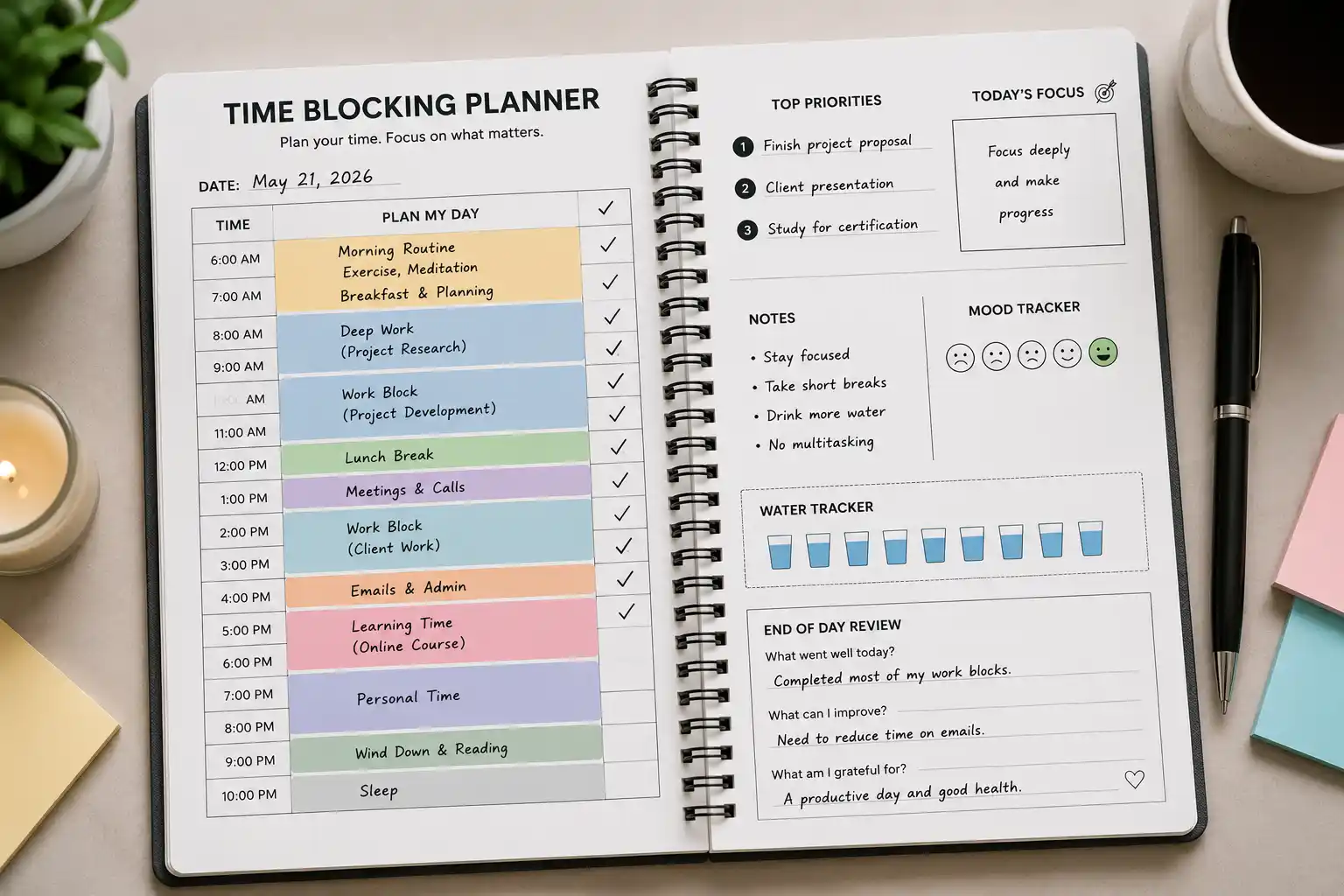
What Is a Time Blocking Planner?
A time blocking planner is a scheduling tool that divides the workday into dedicated blocks of time, each assigned to a specific task, project, or category of work. Rather than working from an open-ended to-do list and reacting to whatever demands appear, time blocking asks you to make deliberate decisions in advance about how every hour of your day will be used — and then protect those decisions against interruption.
The result is a calendar that looks less like a series of meetings and more like a tightly engineered production schedule: 9:00–11:00 AM for deep work, 11:00–11:30 AM for email, 11:30 AM–12:30 PM for team collaboration, 1:30–3:00 PM for creative work, and so on. Every hour has a job. Nothing is left to impulse or availability.
Time blocking is not a new idea. Charles Darwin, Benjamin Franklin, and Elon Musk have all been documented users of structured daily scheduling. But the modern revival of time blocking — driven by Cal Newport’s Deep Work (2016), the rise of remote work, and the collapse of traditional office structure — has made it one of the most widely discussed and implemented productivity strategies of the past decade.
Understanding how a time blocking planner works, what behavioral and cognitive science supports it, how to build one that fits your actual work, and how to recover when the plan inevitably collides with reality is what separates time blocking practitioners who transform their productivity from those who abandon the method after a week.
The Science Behind Time Blocking
Time blocking works because of how the human brain actually processes work — not how we wish it did.
Task Switching and Cognitive Cost
The brain does not multitask. What feels like multitasking is rapid task switching — moving attention between tasks in quick succession — and it carries a measurable cognitive penalty. Research by Dr. David Meyer at the University of Michigan found that task switching reduces productivity by as much as 40%, with each switch requiring a “warm-up” period for the brain to re-engage deeply with the new context.
This switching cost is compounded by interruption. Gloria Mark’s research at the University of California, Irvine found that it takes an average of 23 minutes and 15 seconds to fully return to a task after an interruption. In a knowledge worker’s typical day — punctuated by notifications, messages, meetings, and reactive email — this cost accumulates to hours of lost productive capacity.
Time blocking addresses both problems simultaneously. By dedicating continuous blocks of time to single tasks or task categories, it eliminates task switching within the block. By scheduling specific times for communication and reactive work, it prevents ad hoc interruptions from fragmenting the blocks.
The Planning Fallacy and Buffer Blocks
The planning fallacy — first described by Daniel Kahneman and Amos Tversky in 1979 — is the well-documented human tendency to underestimate how long tasks will take while remaining overconfident in the estimate. Research consistently shows that tasks take 1.5 to 2 times longer than predicted, even when the person has completed similar tasks before and knows from experience that estimates tend to be optimistic.
Time blocking makes the planning fallacy visible and correctable. When a block proves consistently too short for its assigned task, the planner provides direct evidence to recalibrate. More importantly, sophisticated time blocking systems build explicit buffer blocks — 15–30 minute unscheduled periods between task blocks — that absorb the overflow that the planning fallacy guarantees.
Implementation Intentions
A large body of research in social psychology, synthesized by Peter Gollwitzer in his 1999 paper on implementation intentions, demonstrates that plans specified as “When X happens, I will do Y” are dramatically more likely to be executed than vague goal intentions (“I will work on the report this week”). The effect size is substantial: implementation intentions increase follow-through by an average of 200–300% across studies.
A time blocking planner is, essentially, a system of implementation intentions at scale. “At 9:00 AM on Tuesday, I will work on the Q3 analysis for 90 minutes” is an implementation intention. The specificity of time and context dramatically increases the probability of execution over the vaguer alternative of having “Q3 analysis” on a to-do list with no assigned time.
Types of Time Blocking Methods
Time blocking is not a single method but a family of related scheduling approaches. Choosing the right variant depends on the nature of your work, the degree of schedule control you have, and your cognitive style.
1. Traditional Time Blocking
The foundational method. Every hour of the workday is pre-assigned to a specific task or project before the day begins. Each block has a clear start time, end time, and assigned activity.
Best for: Knowledge workers with significant schedule autonomy, writers, researchers, developers, and anyone whose deep work requires sustained uninterrupted focus.
Limitation: Requires high schedule control. Frequent unplanned meetings or reactive demands make rigid time blocks difficult to protect.
2. Task Batching
Similar tasks are grouped together into a single block rather than spreading them throughout the day. Email is answered in two scheduled batches (morning and afternoon) rather than continuously. Administrative tasks are batched into a single Friday afternoon block. Phone calls are scheduled back-to-back in a single slot.
Task batching leverages the same context-switching research as traditional blocking but is more flexible — it focuses on grouping work types rather than assigning specific tasks to specific times.
Best for: Roles with high administrative load, managers with frequent communication demands, and anyone who struggles with the granularity of traditional time blocking.
3. Time Boxing
A time box assigns a fixed maximum duration to a task, after which work on that task stops regardless of completion status. Where traditional time blocking asks “when will I work on this?”, time boxing also asks “how long is this task worth?”
Time boxing is borrowed from software development (Scrum sprints are formalized time boxes) and is particularly effective for tasks that tend to expand indefinitely — the Parkinson’s Law problem that “work expands to fill the time available.”
Best for: Creative projects with fuzzy scope, planning tasks, and any work where perfectionism or scope creep is a recurring problem.
4. Day Theming
Rather than blocking hours within a day, day theming assigns each day of the week to a category of work. Monday is for strategy and planning. Tuesday and Wednesday are for deep individual work. Thursday is for meetings and collaboration. Friday is for review, admin, and professional development.
Jack Dorsey famously used day theming to run both Twitter and Square simultaneously, assigning each company a different day of the week. The method works by eliminating the daily context-switching between work modes entirely.
Best for: Executives, entrepreneurs, and anyone managing multiple distinct roles or projects simultaneously.
5. The Ideal Week Template
Rather than planning each week from scratch, the ideal week method creates a recurring template of the optimal weekly schedule and uses it as the default that each specific week deviates from deliberately, rather than accidentally.
The template reflects priorities rather than just commitments — blocking time for deep work before it gets displaced by meetings, scheduling exercise before it gets displaced by overruns, and protecting personal time before it gets consumed by work expansion.
Best for: Anyone whose weeks tend to be reactive and whose ideal schedule never seems to materialize without explicit protection.
How to Build a Time Blocking Planner: Step by Step
Step 1: Conduct a Time Audit
Before building any schedule, understand how your time is actually being spent versus how you believe it is being spent. Track every activity in 30-minute increments for one full work week — including meetings, email, social media, context switching, and genuine deep work.
The results are reliably surprising. Most knowledge workers discover that their actual deep work time averages 90 minutes to 3 hours per day — far less than they estimate — and that reactive communication consumes a majority of the remainder.
The audit provides the baseline from which a time blocking system is designed, not guessed.
Step 2: Identify Your Peak Energy Windows
Cognitive performance is not uniform across the day. Research on circadian variation in cognitive ability consistently shows that most people have a peak performance window of 2–4 hours when alertness, working memory, and executive function are at their highest. For morning chronotypes, this is typically 9:00–11:00 AM. For evening chronotypes, it may be 5:00–7:00 PM.
The cardinal rule of time blocking: protect your peak energy window for your most cognitively demanding work. Schedule deep work, complex analysis, creative production, and strategic thinking into this window. Schedule email, administrative tasks, routine meetings, and low-complexity work into your off-peak hours.
Step 3: List and Categorize Your Work
Every recurring work activity falls into one of three categories:
Deep work: Cognitively demanding tasks that produce high-value output and require sustained, uninterrupted focus. Writing, coding, analysis, strategic planning, complex problem-solving. Requires peak energy and protected time.
Shallow work: Logistical, administrative, and communication tasks that are necessary but not cognitively demanding. Email, scheduling, expense reports, routine meetings, data entry. Can be performed in off-peak hours and batched effectively.
Recovery and maintenance: Breaks, meals, exercise, personal commitments, and the buffer time that absorbs planning fallacy overruns. Often underweighted in scheduling but essential to sustaining the entire system.
Step 4: Build Your Template
Using the time audit data, your peak energy window, and your work category list, construct a weekly template:
Sample Template — Knowledge Worker
| Time | Monday | Tuesday | Wednesday | Thursday | Friday |
|---|---|---|---|---|---|
| 8:00–8:30 | Morning routine + review | Morning routine + review | Morning routine + review | Morning routine + review | Morning routine + review |
| 8:30–11:00 | Deep work block | Deep work block | Deep work block | Deep work block | Weekly review |
| 11:00–11:30 | Email batch 1 | Email batch 1 | Email batch 1 | Email batch 1 | Admin + planning |
| 11:30–12:30 | Meetings | Meetings | Meetings | Meetings | Learning block |
| 12:30–1:30 | Lunch + recovery | Lunch + recovery | Lunch + recovery | Lunch + recovery | Lunch + recovery |
| 1:30–3:00 | Project work | Project work | Project work | Meetings | Shallow work batch |
| 3:00–3:15 | Buffer | Buffer | Buffer | Buffer | Buffer |
| 3:15–4:30 | Shallow work batch | Deep work block 2 | Creative work | Project work | Personal development |
| 4:30–5:00 | Email batch 2 + EOD review | Email batch 2 + EOD review | Email batch 2 + EOD review | Email batch 2 + EOD review | Shutdown ritual |
Step 5: Schedule the Shutdown Ritual
Cal Newport’s concept of the shutdown ritual is one of the most practically important and most commonly omitted elements of a time blocking system. A shutdown ritual is a fixed end-of-day sequence — typically 10–15 minutes — that includes reviewing the next day’s calendar, processing any open to-do items into the appropriate system, and explicitly declaring work complete for the day.
The ritual serves a cognitive function: it signals to the brain that work is genuinely finished, reducing the Zeigarnik effect — the tendency for incomplete tasks to intrude on consciousness. Without a deliberate shutdown, unfinished work follows people into evenings and weekends as persistent background cognitive load, degrading both rest quality and next-day performance.
The verbal or written declaration “Shutdown complete” (Newport’s literal phrase) sounds almost absurdly ceremonial — and is remarkably effective.
Time Blocking for Different Work Types
Time Blocking for Managers and Executives
Managers face a structural challenge that individual contributors do not: their work is inherently collaborative and reactive. A manager who blocks 4 hours of deep work every morning and refuses meetings during that window may be protecting their own productivity at the expense of their team’s.
The solution is maker-manager scheduling, a framework articulated by Paul Graham in his 2009 essay “Maker’s Schedule, Manager’s Schedule.” Managers often function best on a schedule built primarily from meeting blocks, with shallow work batched around them — while protecting one or two deep work blocks per week for strategic thinking, writing, and planning that genuinely requires uninterrupted focus.
For managers, the most valuable time blocking application is often not deep work protection but meeting batching — consolidating all recurring meetings into specific days (Tuesday and Thursday, for example) to leave the remaining days clear for individual contribution and reactive demands.
Time Blocking for Creative Work
Creative work presents a different challenge: inspiration and creative flow do not reliably appear on schedule. A writer who blocks 9:00–11:00 AM for writing will sometimes sit down to a blank page and produce nothing of value for the entire block.
The solution most professional writers and creative practitioners arrive at is to separate generative and editorial work into different blocks, and to treat the generative block as a commitment to showing up and working — not a guarantee of output quality. The block creates the conditions for creative work; what happens within it cannot be fully controlled.
Many professional writers — including Stephen King, Maya Angelou, and Toni Morrison — have described fixed daily writing blocks as the foundation of their output, regardless of how they feel on any given morning. The block precedes the inspiration; the inspiration does not precede the block.
Time Blocking for Remote Workers
Remote work removes the ambient social pressure of an office environment that formerly enforced certain behavioral norms (arriving at a consistent time, taking a lunch break, stopping at 5:00 PM). Without those external cues, workdays expand, boundaries blur, and the reactive demands of always-on communication colonize all available time.
For remote workers, time blocking serves a secondary function beyond productivity optimization: it creates the structure that the office environment previously provided externally. The time blocking planner is the scaffolding that holds the workday together when no external structure exists.
Remote work-specific time blocking considerations:
- Schedule a fixed start ritual that signals the beginning of work, replacing the commute as a psychological transition.
- Build explicit social blocks for team communication that would happen organically in an office.
- Schedule a hard end time and a shutdown ritual that replaces the physical act of leaving the office.
- Build movement breaks into the schedule — the ambient movement of office life (walking to meetings, going to the printer, commuting) does not exist in home environments.
Time Blocking Templates
Template 1: The Deep Work Day (Individual Contributor)
6:00–7:00   Morning routine (exercise, breakfast, review)
7:00–9:00   Deep work block 1 (highest priority project)
9:00–9:15   Buffer
9:15–11:15  Deep work block 2 (second priority project)
11:15–11:45 Email batch 1 + Slack catch-up
11:45–12:30 Meetings or calls
12:30–1:30  Lunch + recovery (walk, no screens)
1:30–3:00   Project work (medium complexity)
3:00–3:15   Buffer
3:15–4:15   Shallow work batch (admin, scheduling, routine tasks)
4:15–4:45   Email batch 2
4:45–5:00   Shutdown ritual
Template 2: The Manager’s Day
8:00–8:30   Morning review (calendar, messages, priorities)
8:30–9:30   Deep work block (strategy, writing, planning — protected)
9:30–10:00  Team check-in
10:00–12:00 Meeting block (1:1s, team meetings, stakeholder calls)
12:00–1:00  Lunch + recovery
1:00–2:30   Meeting block continuation
2:30–3:00   Buffer + reactive email
3:00–4:30   Project work / review / decisions
4:30–5:00   EOD review + shutdown ritual
Template 3: The Creative Worker’s Day
7:00–7:30   Morning ritual (coffee, light reading — no email)
7:30–10:30  Generative creative block (writing, designing, composing)
10:30–11:00 Break + movement
11:00–12:30 Editorial/revision block
12:30–1:30  Lunch
1:30–3:00   Administrative and communication batch
3:00–3:15   Buffer
3:15–4:30   Learning and research block
4:30–5:00   Review + shutdown ritual
Common Time Blocking Mistakes and How to Avoid Them
Over-scheduling every minute. A schedule with zero slack is a schedule that fails the moment one task runs long — which it will, every day, because of the planning fallacy. Build buffer blocks of 15–30 minutes between major task blocks as explicit overflow absorption.
Scheduling shallow work during peak energy. Answering email at 9:00 AM — when cognitive performance is at its daily peak — is one of the most common and costly time blocking mistakes. Reserve peak hours for work that genuinely requires peak performance.
Making the plan too rigid to survive contact with reality. A time blocking planner is a plan, not a contract. When reality diverges from the plan — and it will — the response is rapid replanning, not distress. Keep the template as the default and update the specific day’s plan in real time as events require.
Failing to batch communication. Leaving email and messaging applications open during deep work blocks defeats the entire purpose of blocking. Notifications are the primary delivery mechanism for the switching costs and interruptions that time blocking exists to prevent.
Skipping the weekly review. Time blocking without a weekly review produces a static schedule that gradually drifts from alignment with actual priorities. The weekly review — typically 30–60 minutes on Friday afternoon or Sunday evening — audits the previous week, updates the ideal week template, and sets specific blocks for the coming week.
Not protecting the blocks from others. A time block only works if it is treated as a commitment. Blocks scheduled for deep work must appear as busy on shared calendars, have do-not-disturb enabled on devices, and be communicated to colleagues and managers as legitimate working time — not free time available for meetings.
Frequently Asked Questions
What is time blocking and how does it work?
Time blocking is a scheduling method that assigns every hour of the workday to a specific task or category of work in advance. It reduces task switching, protects deep work from interruption, and converts vague intentions into specific implementation plans that are dramatically more likely to be executed.
How many hours of deep work can a person realistically do per day?
Research by Anders Ericsson on deliberate practice and Cal Newport’s survey of knowledge worker output suggests that 4 hours of genuine deep work per day is the realistic maximum for most people. Many exceptional performers average 3–4 hours. Attempting more produces diminishing returns and cognitive depletion.
What is the difference between time blocking and a to-do list?
A to-do list captures what needs to be done; a time blocking planner specifies when it will be done. To-do lists are inventory systems; time blocking planners are production schedules. The research on implementation intentions shows that the “when” commitment is what drives follow-through.
How do I handle meetings that conflict with time blocks?
Meetings that cannot be declined or rescheduled take priority. After the meeting, replan the remaining day’s blocks rather than abandoning the system. Over time, use the data about which blocks are most frequently disrupted to move them to better-protected times.
What tools are best for time blocking?
Google Calendar, Apple Calendar, and Outlook are the most widely used digital tools — any calendar application that allows color-coded blocks and repeating events works well. Dedicated tools include Reclaim.ai (which automatically schedules tasks around meetings), Sunsama (daily planning focused), and Fantastical (natural language scheduling). Paper planners with hourly time grids — including the Full Focus Planner and Passion Planner — are popular analog alternatives.
How long should time blocks be?
Research on sustained attention suggests that 90-minute blocks align with the brain’s natural ultradian rhythm — the 90–120 minute cycle of alertness and rest that mirrors sleep cycle structure. Deep work blocks of 60–120 minutes with 15–20 minute recovery breaks between them produce the best combination of output quality and cognitive sustainability.
Can time blocking work for people with unpredictable schedules?
Yes, with adaptation. Rather than blocking specific tasks to specific times, people with unpredictable schedules can use task batching (grouping similar work types) and protected minimum blocks (committing to at least one uninterrupted deep work block per day, wherever it fits). The ideal week template approach also helps — it establishes the default that gets adapted to reality rather than a rigid plan that breaks under variability.
How is time blocking different from the Pomodoro Technique?
The Pomodoro Technique uses fixed 25-minute work intervals followed by 5-minute breaks, cycling repeatedly throughout the day. It is a focus technique within a session. Time blocking is a scheduling architecture for the entire day and week. The two are complementary — time blocking decides what to work on and when; the Pomodoro Technique structures how to work within a block.
Conclusion
A time blocking planner is the most direct implementation of a fundamental productivity truth: time is the one resource that cannot be recovered, and the only way to protect it is to make deliberate decisions about it before the day’s demands make those decisions for you.
The science is consistent across task switching research, implementation intention studies, and circadian performance data — planning how time will be used in advance, protecting peak energy for peak work, and batching like tasks together produces more output of higher quality than reactive scheduling, regardless of how hard the person is working in either system.
The method requires honest self-knowledge, a willingness to treat your own schedule as seriously as you treat others’ time, and the flexibility to replan without self-recrimination when reality diverges from the template. Practiced consistently, it does not just improve what gets done — it changes the relationship between the practitioner and time itself.