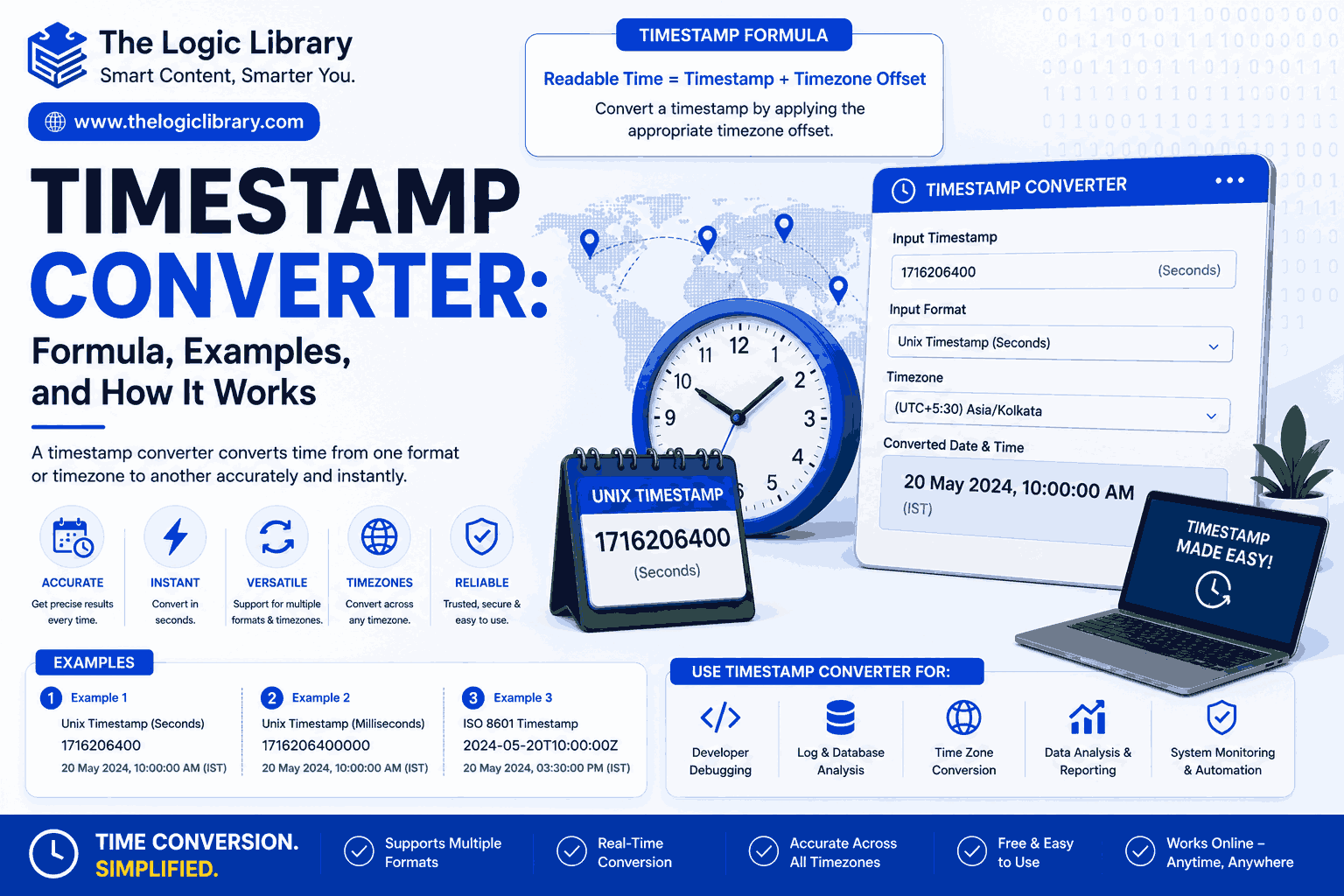
A Timestamp Converter is a valuable tool used to convert Unix timestamps into human-readable dates and times, and vice versa. Whether you’re a software developer, database administrator, cybersecurity analyst, system engineer, or simply working with digital records, a Timestamp Converter helps interpret time-based data accurately and efficiently.
Timestamps are widely used in operating systems, databases, APIs, logs, mobile applications, and web platforms. While timestamps are ideal for computers because they store time as numerical values, they can be difficult for humans to understand at a glance. A Timestamp Converter bridges this gap by translating timestamps into readable date and time formats.
In this guide, you’ll learn how a Timestamp Converter works, the formulas behind timestamp calculations, practical examples, common use cases, and the benefits of using timestamp conversion tools.
What Is a Timestamp Converter?
A Timestamp Converter is a tool that converts a timestamp value into a standard date and time format or converts a date and time into a timestamp.
A timestamp is typically represented as the number of seconds or milliseconds that have elapsed since a specific reference point called the Unix Epoch.
Unix Epoch
The Unix Epoch began on:
January 1, 1970, 00:00:00 UTC
Every timestamp represents the number of seconds that have passed since this moment.
For example:
Timestamp: 0
Represents:
January 1, 1970, 00:00:00 UTC
A Timestamp Converter automatically performs these conversions.
Why Use a Timestamp Converter?
Timestamps are machine-friendly but not user-friendly. A Timestamp Converter helps users quickly understand when an event occurred.
Benefits of Using a Timestamp Converter
- Converts timestamps instantly
- Improves data readability
- Simplifies debugging
- Assists database management
- Helps analyze logs and records
- Supports software development
- Reduces manual conversion errors
Without a Timestamp Converter, interpreting large timestamp values can be difficult and time-consuming.
How a Timestamp Converter Works
A Timestamp Converter uses mathematical calculations to translate timestamps into dates and times.
The process generally involves:
- Reading the timestamp value.
- Calculating the number of elapsed seconds or milliseconds.
- Counting days, months, and years since January 1, 1970.
- Displaying the result in a readable date and time format.
The reverse process converts a date and time into the corresponding timestamp.
Timestamp Converter Formula
The fundamental formula behind a Timestamp Converter is:
Timestamp = Date and Time − Unix Epoch
Where:
- Unix Epoch = January 1, 1970, 00:00:00 UTC
- Timestamp is measured in seconds
Example
Date:
January 2, 1970, 00:00:00 UTC
Calculation:
1 Day × 24 × 60 × 60
Result:
86,400
Timestamp:
86400
A Timestamp Converter performs this calculation automatically.
Timestamp Converter Formula for Milliseconds
Many modern systems use milliseconds instead of seconds.
Formula
Timestamp in Milliseconds = Timestamp in Seconds × 1000
Example
Timestamp:
86400 Seconds
Calculation:
86400 × 1000
Result:
86,400,000 Milliseconds
A Timestamp Converter can convert between both formats.
Converting a Timestamp to a Date
One of the most common functions of a Timestamp Converter is converting timestamps into readable dates.
Example
Timestamp:
1719792000
Result:
July 1, 2024, 12:00:00 AM UTC
Instead of interpreting a long numerical value manually, users can instantly identify the exact date and time.
Converting a Date to a Timestamp
A Timestamp Converter can also generate a timestamp from a specific date.
Example
Date:
January 1, 2025, 00:00:00 UTC
Calculation:
Count all seconds between:
January 1, 1970
and
January 1, 2025
Result:
1735689600
This timestamp can then be used in applications, APIs, and databases.
Understanding UTC in Timestamp Conversion
A Timestamp Converter typically uses UTC (Coordinated Universal Time) as its standard reference.
UTC ensures consistency regardless of the user’s local time zone.
For example:
- New York
- London
- Tokyo
- Sydney
may all display different local times, but the underlying timestamp remains identical.
This consistency is one of the main reasons timestamps are widely used in computing systems.
Timestamp Converter and Time Zones
Although timestamps are stored in UTC, a Timestamp Converter can display results in local time zones.
Example
Timestamp:
1735689600
UTC:
January 1, 2025, 12:00 AM
Pakistan (UTC+5):
January 1, 2025, 5:00 AM
New York (UTC−5):
December 31, 2024, 7:00 PM
The timestamp remains unchanged, but the displayed time varies based on location.
Timestamp Converter Example: Website Logs
Web servers record visitor activity using timestamps.
Example
Log Entry:
1735689600
Timestamp Converter Output:
January 1, 2025, 00:00:00 UTC
This helps administrators identify exactly when a user accessed a website.
Timestamp Converter Example: Database Records
Databases often store creation and modification dates as timestamps.
Example
User Registration Timestamp:
1738368000
Converted Date:
February 1, 2025
A Timestamp Converter makes these records easier to understand and analyze.
Timestamp Converter Example: Mobile Applications
Mobile apps frequently use timestamps to track:
- User activity
- Notifications
- Login sessions
- Purchases
Example
Timestamp:
1740787200
Converted Date:
March 1, 2025
Developers use Timestamp Converters to troubleshoot and verify application behavior.
Common Timestamp Formats
A Timestamp Converter may support multiple formats.
Unix Timestamp
Measures seconds since January 1, 1970.
Example:
1735689600
Millisecond Timestamp
Measures milliseconds since January 1, 1970.
Example:
1735689600000
ISO 8601
Human-readable date format.
Example:
2025-01-01T00:00:00Z
RFC 2822
Commonly used in email systems.
Example:
Wed, 01 Jan 2025 00:00:00 GMT
Many Timestamp Converter tools support all of these formats.
Common Uses of a Timestamp Converter
Software Development
Developers use Timestamp Converters when building applications and APIs.
Database Administration
Database managers convert timestamps into readable dates for analysis and reporting.
Cybersecurity
Security analysts use timestamps to investigate system events and security incidents.
Server Monitoring
System administrators analyze server logs using timestamp conversions.
Financial Systems
Banks and payment processors track transactions using timestamps.
Data Analytics
Analysts convert timestamps into dates to identify trends and patterns.
Advantages of Using a Timestamp Converter
Saves Time
Instantly converts complex numerical timestamps.
Improves Accuracy
Eliminates manual conversion mistakes.
Simplifies Debugging
Developers can quickly identify event times.
Enhances Data Analysis
Readable dates make reports easier to understand.
Supports Multiple Formats
Many Timestamp Converters handle Unix, UTC, ISO, and millisecond timestamps.
Common Mistakes in Timestamp Conversion
Confusing Seconds and Milliseconds
A common mistake is treating milliseconds as seconds.
Example:
1735689600
vs.
1735689600000
The second value is 1000 times larger.
Ignoring Time Zones
Timestamps are stored in UTC, but displayed times may differ by location.
Using Incorrect Date Formats
Different systems may display dates differently.
Examples:
- MM/DD/YYYY
- DD/MM/YYYY
- YYYY-MM-DD
Misinterpreting Epoch Time
Remember that all Unix timestamps begin from January 1, 1970.
A Timestamp Converter helps avoid these issues.
Features of Modern Timestamp Converter Tools
Today’s Timestamp Converter tools often include:
- Unix timestamp conversion
- Millisecond conversion
- Date-to-timestamp conversion
- Timestamp-to-date conversion
- UTC conversion
- Local time zone support
- ISO 8601 formatting
- Real-time timestamp generation
- API-friendly outputs
- Mobile compatibility
These features make timestamp conversion fast and reliable.
Who Should Use a Timestamp Converter?
A Timestamp Converter is useful for:
- Software Developers
- Database Administrators
- DevOps Engineers
- Cybersecurity Professionals
- Data Analysts
- System Administrators
- Web Developers
- Cloud Engineers
- API Developers
- IT Students
Anyone working with time-based digital records can benefit from a Timestamp Converter.
Best Practices for Timestamp Management
When working with timestamps:
- Store timestamps in UTC.
- Convert to local time only for display.
- Verify whether timestamps use seconds or milliseconds.
- Use standard date formats whenever possible.
- Test conversions across different time zones.
These practices improve consistency and prevent data errors.
The Future of Timestamp Conversion
As cloud computing, IoT devices, artificial intelligence, and distributed systems continue to expand, timestamps will remain essential for tracking events across platforms. Modern Timestamp Converter tools are becoming more advanced, supporting multiple formats, automated time zone adjustments, and real-time integrations with databases and APIs.
The growing importance of data analytics and cybersecurity also increases the demand for accurate timestamp interpretation and conversion.
Conclusion
A Timestamp Converter is an indispensable tool for converting timestamps into readable dates and converting dates back into timestamps. By using Unix Epoch calculations and UTC standards, a Timestamp Converter provides accurate and consistent time conversions across different systems, databases, and applications.
Whether you’re debugging software, analyzing logs, managing databases, investigating security events, or working with APIs, a Timestamp Converter simplifies complex calculations and helps you understand time-based data quickly. As technology continues to evolve, timestamp conversion will remain a critical part of modern computing, making Timestamp Converter tools more valuable than ever.
Frequently Asked Questions (FAQs) About Timestamp Converter
1. What is a Timestamp Converter?
A Timestamp Converter is a tool that converts Unix timestamps into human-readable dates and times, and vice versa. It helps users understand and work with time-based data stored in systems, databases, applications, and logs.
2. How does a Timestamp Converter work?
A Timestamp Converter calculates the number of seconds or milliseconds that have passed since the Unix Epoch (January 1, 1970, 00:00:00 UTC) and converts that value into a readable date and time format.
3. What is a timestamp?
A timestamp is a numeric value that represents a specific point in time. In Unix systems, it typically measures the number of seconds that have elapsed since January 1, 1970 (UTC).
4. What is the Unix Epoch?
The Unix Epoch is the starting point used by Unix-based systems to calculate timestamps:
January 1, 1970, 00:00:00 UTC
All Unix timestamps are measured relative to this date and time.
5. What is the formula used by a Timestamp Converter?
The basic formula is:
Timestamp = Date and Time − Unix Epoch
To convert back:
Date and Time = Unix Epoch + Timestamp
6. What is the difference between a timestamp and a date?
A timestamp is a machine-readable numeric value, while a date is a human-readable representation of time.
Example:
- Timestamp: 1735689600
- Date: January 1, 2025, 12:00 AM UTC
7. Can a Timestamp Converter convert dates into timestamps?
Yes. Most Timestamp Converter tools support both:
- Timestamp to Date conversion
- Date to Timestamp conversion
8. Why are timestamps used in computers?
Timestamps provide a standardized way to record and compare time across different systems, databases, and applications without worrying about local time zones.
9. What is UTC in Timestamp Conversion?
UTC (Coordinated Universal Time) is the global time standard used for timestamp calculations. Most timestamps are stored in UTC and then converted to local time when displayed.
10. Does a Timestamp Converter account for time zones?
Yes. Many Timestamp Converter tools allow users to view timestamps in different time zones while keeping the original timestamp unchanged.
11. What is the difference between seconds and milliseconds timestamps?
A seconds-based timestamp uses seconds since the Unix Epoch.
Example:
1735689600
A milliseconds-based timestamp uses milliseconds since the Unix Epoch.
Example:
1735689600000
Milliseconds timestamps are 1,000 times larger.
12. How can I tell if a timestamp is in milliseconds?
A milliseconds timestamp usually contains 13 digits, while a seconds timestamp typically contains 10 digits.
Example:
- Seconds: 1735689600
- Milliseconds: 1735689600000
13. Can a Timestamp Converter handle future dates?
Yes. A Timestamp Converter can convert timestamps representing future dates and times.
14. Can a Timestamp Converter convert historical dates?
Yes. Most Timestamp Converter tools can convert dates and timestamps from both past and future periods.
15. Is a Timestamp Converter accurate?
Yes. Timestamp Converters use mathematical calculations based on the Unix Epoch and UTC standards, making them highly accurate.
16. What are common uses of a Timestamp Converter?
Common uses include:
- Software development
- Database management
- API integration
- Server log analysis
- Cybersecurity investigations
- Cloud computing
- Data analytics
17. Why do developers use a Timestamp Converter?
Developers use Timestamp Converters to debug applications, analyze logs, test APIs, and convert machine-readable timestamps into understandable dates.
18. Can a Timestamp Converter be used for database records?
Yes. Many databases store dates as timestamps. A Timestamp Converter helps administrators interpret and verify those records.
19. Can a Timestamp Converter help with log analysis?
Absolutely. Server logs, application logs, and security logs often use timestamps to record events. Converting them helps identify when activities occurred.
20. What timestamp format is most commonly used?
The most widely used format is the Unix timestamp, which measures seconds since January 1, 1970 UTC.
21. Does a Timestamp Converter support ISO 8601 dates?
Many advanced Timestamp Converter tools support ISO 8601 formatting.
Example:
2025-01-01T00:00:00Z
22. Can a Timestamp Converter generate the current timestamp?
Yes. Most online Timestamp Converter tools can instantly generate the current Unix timestamp in seconds or milliseconds.
23. What is the advantage of storing timestamps instead of dates?
Timestamps:
- Use less storage
- Simplify calculations
- Avoid time zone inconsistencies
- Enable easier sorting and comparison
24. Can a Timestamp Converter convert timestamps from APIs?
Yes. API responses frequently contain timestamps, and a Timestamp Converter helps translate them into readable dates.
25. Is a Timestamp Converter useful for cybersecurity professionals?
Yes. Security analysts often use Timestamp Converters to investigate incidents, track login attempts, and analyze system activity timelines.
26. Can a Timestamp Converter be used on mobile devices?
Yes. Most modern Timestamp Converter tools are fully responsive and work on smartphones, tablets, and desktop computers.
27. What mistakes can a Timestamp Converter help prevent?
A Timestamp Converter helps avoid:
- Misreading timestamps
- Time zone errors
- Seconds vs. milliseconds confusion
- Incorrect date calculations
- Log interpretation mistakes
28. Is a Timestamp Converter free to use?
Most online Timestamp Converter tools are completely free and accessible without registration.
29. Who should use a Timestamp Converter?
A Timestamp Converter is useful for:
- Software Developers
- Database Administrators
- DevOps Engineers
- Cybersecurity Analysts
- Data Scientists
- Cloud Engineers
- IT Professionals
- Students learning programming
30. Why is a Timestamp Converter important?
A Timestamp Converter makes it easy to understand, analyze, and manage time-based data. It converts complex timestamp values into readable dates, helping users work more efficiently with logs, databases, APIs, and digital systems.
Related Topics:
- Time Zone Calculator: Formula, Examples, and How It Works
- Date Calculator: Formula, Examples, and How It Works
- Salary Conversions Explained: Hourly to Annual (Examples, Tables, & Unpaid Time Adjustments)
- Time Calculator: Formula, Examples, and How It Works
- Age Calculator: Formula, Examples, and How It Works