In today’s fast-paced digital world, staying focused can be difficult. Constant notifications, multitasking, and endless distractions often reduce productivity. This is where a Pomodoro Timer becomes a powerful productivity tool. A Pomodoro Timer helps people work in short, focused sessions followed by scheduled breaks, making it easier to maintain concentration and avoid burnout. Whether you’re a student, freelancer, remote worker, or business professional, understanding how a Pomodoro Timer works can significantly improve your efficiency and time management skills.
What Is a Pomodoro Timer?
A Pomodoro Timer is a time-management technique developed by Francesco Cirillo in the late 1980s. The method divides work into focused intervals, traditionally 25 minutes long, followed by short breaks.
Each focused work session is called a “Pomodoro,” which is the Italian word for tomato. Cirillo named the technique after the tomato-shaped kitchen timer he used while studying.
The primary goal of the Pomodoro Timer is to improve concentration by encouraging people to focus on one task at a time while taking regular breaks to refresh their minds.
How a Pomodoro Timer Works
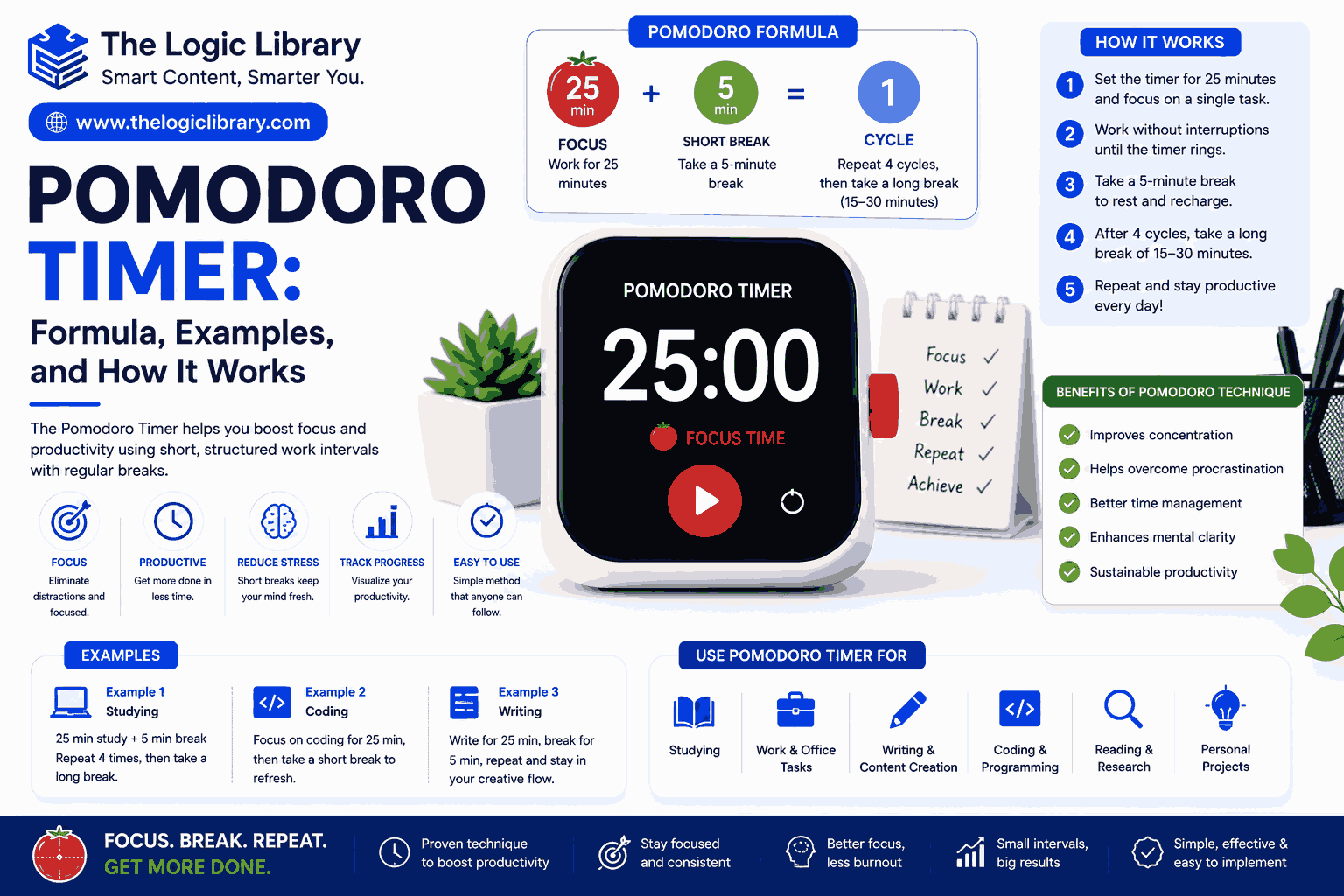
The Pomodoro Technique follows a simple cycle:
- Choose a task.
- Set a timer for 25 minutes.
- Work without interruptions until the timer rings.
- Take a 5-minute break.
- Repeat the process four times.
- After completing four Pomodoros, take a longer break of 15–30 minutes.
This structured approach helps maintain mental energy throughout the day and reduces procrastination.
Pomodoro Timer Formula
The standard Pomodoro Timer formula is:
Work Time + Short Break = One Pomodoro Cycle
Standard Pomodoro Timer Formula
25 Minutes Work + 5 Minutes Break = 30 Minutes Cycle
After four cycles:
(25 × 4) + (5 × 3) + Long Break
100 + 15 + 15–30 = 130–145 Minutes
This means four Pomodoro sessions typically take between 2 hours and 2 hours 25 minutes.
Why the Pomodoro Timer Formula Works
The human brain struggles to maintain deep concentration for extended periods. Research shows that short bursts of focused work often produce better results than long, uninterrupted sessions.
The Pomodoro Timer formula works because it:
- Reduces mental fatigue
- Prevents burnout
- Improves focus
- Creates urgency
- Encourages task completion
- Makes large projects manageable
- Increases motivation
Instead of thinking about working for several hours, you only commit to 25 minutes at a time.
History of the Pomodoro Timer
The Pomodoro Technique was created by Francesco Cirillo while he was a university student. He noticed that traditional study methods often led to distractions and reduced productivity.
Using a tomato-shaped kitchen timer, he challenged himself to stay focused for 25 minutes. The experiment proved effective, eventually evolving into the productivity system now used worldwide.
Today, digital Pomodoro Timer apps, browser extensions, websites, and productivity tools make the technique more accessible than ever.
Benefits of Using a Pomodoro Timer
Pomodoro Timer Improves Focus
Knowing that you only need to concentrate for 25 minutes makes it easier to eliminate distractions and stay committed to a task.
Pomodoro Timer Reduces Procrastination
Large projects can feel overwhelming. Breaking work into smaller intervals makes starting easier and reduces procrastination.
Pomodoro Timer Prevents Burnout
Frequent breaks allow the brain to recover, helping maintain productivity throughout the day.
Pomodoro Timer Enhances Time Awareness
Many people underestimate or overestimate how long tasks take. Using a Pomodoro Timer helps track actual work time.
Pomodoro Timer Encourages Better Planning
By counting Pomodoros, you can estimate project timelines more accurately and improve workflow management.
Pomodoro Timer Example for Students
Imagine a student preparing for a math exam.
Study Schedule Using a Pomodoro Timer
Pomodoro 1: Algebra Practice (25 minutes)
Break: 5 minutes
Pomodoro 2: Geometry Problems (25 minutes)
Break: 5 minutes
Pomodoro 3: Review Notes (25 minutes)
Break: 5 minutes
Pomodoro 4: Practice Test (25 minutes)
Long Break: 20 minutes
Total productive study time:
25 × 4 = 100 minutes
This approach helps students remain focused without feeling mentally exhausted.
Pomodoro Timer Example for Remote Workers
Remote employees often face distractions from social media, household responsibilities, and messaging apps.
A Pomodoro Timer can structure the workday effectively.
Daily Work Routine
- Email management: 2 Pomodoros
- Project work: 4 Pomodoros
- Meetings: 2 Pomodoros
- Documentation: 2 Pomodoros
Total:
10 Pomodoros = 250 minutes of focused work
This equals more than four hours of highly concentrated productivity.
Pomodoro Timer Example for Writers
Content creators and writers frequently struggle with writer’s block.
A Pomodoro Timer can break writing projects into manageable sessions.
Example:
- Research: 2 Pomodoros
- Outline creation: 1 Pomodoro
- Writing draft: 4 Pomodoros
- Editing: 2 Pomodoros
Total:
9 Pomodoros = 225 minutes
This structure helps writers maintain momentum and complete projects faster.
Customizing the Pomodoro Timer
Although the traditional Pomodoro Timer uses 25-minute sessions, customization is common.
Short Pomodoro Timer
- 15 minutes work
- 3 minutes break
Ideal for:
- Beginners
- Young students
- Quick tasks
Standard Pomodoro Timer
- 25 minutes work
- 5 minutes break
Ideal for:
- Most productivity tasks
- Office work
- Study sessions
Extended Pomodoro Timer
- 50 minutes work
- 10 minutes break
Ideal for:
- Deep work
- Programming
- Research projects
The best timer length depends on personal concentration levels and task complexity.
Best Tasks for a Pomodoro Timer
The Pomodoro Technique works particularly well for:
- Studying
- Writing
- Coding
- Graphic design
- SEO work
- Data analysis
- Research
- Reading
- Learning new skills
- Administrative tasks
Any activity requiring sustained concentration can benefit from a Pomodoro Timer.
Tasks That May Not Fit a Pomodoro Timer
Although highly effective, the Pomodoro Technique is not ideal for every situation.
Examples include:
- Emergency response work
- Customer support calls
- Live presentations
- Continuous meetings
- Real-time troubleshooting
These activities often require uninterrupted attention beyond a fixed timer schedule.
Common Mistakes When Using a Pomodoro Timer
Ignoring Breaks
Many users skip breaks to continue working. This reduces the effectiveness of the technique and increases fatigue.
Multitasking
A Pomodoro should focus on one task only. Switching tasks lowers productivity.
Allowing Interruptions
Phone notifications, emails, and social media should be minimized during each session.
Setting Unrealistic Goals
Trying to complete an entire project in one Pomodoro can create frustration. Break tasks into smaller steps.
Digital Tools for Pomodoro Timer Tracking
Many digital tools offer Pomodoro Timer functionality.
Popular features include:
- Countdown timers
- Productivity reports
- Task management
- Focus music
- Website blockers
- Progress tracking
Some users prefer mobile apps, while others use browser-based Pomodoro Timer websites.
Pomodoro Timer vs Traditional Time Management
| Feature | Pomodoro Timer | Traditional Work Method |
|---|---|---|
| Focus Sessions | Structured | Unstructured |
| Breaks | Regular | Often skipped |
| Productivity Tracking | Easy | Difficult |
| Mental Fatigue | Reduced | Higher |
| Motivation | Higher | Variable |
| Time Awareness | Strong | Limited |
This comparison highlights why many professionals prefer the Pomodoro Technique.
Pomodoro Timer for Team Productivity
Teams can also benefit from synchronized Pomodoro sessions.
Advantages include:
- Better focus
- Reduced interruptions
- Improved collaboration
- Clear work intervals
- Higher accountability
Many remote companies use Pomodoro-based workflows to improve efficiency across distributed teams.
How to Start Using a Pomodoro Timer Today
Getting started requires only a few steps:
- Choose an important task.
- Set a timer for 25 minutes.
- Remove distractions.
- Focus exclusively on the task.
- Take a 5-minute break when the timer rings.
- Repeat the process.
- Track completed Pomodoros.
Consistency is more important than perfection.
Frequently Asked Questions
What is a Pomodoro Timer?
A Pomodoro Timer is a productivity tool that divides work into focused intervals, usually 25 minutes long, followed by short breaks.
Why is it called a Pomodoro Timer?
The technique was named after a tomato-shaped kitchen timer used by creator Francesco Cirillo. “Pomodoro” means tomato in Italian.
What is the standard Pomodoro Timer formula?
The traditional formula is:
25 minutes work + 5 minutes break
After four cycles, a longer 15–30 minute break is taken.
Can I customize the Pomodoro Timer?
Yes. Many people use 15, 30, 45, or 50-minute work sessions depending on their concentration level and task type.
Is the Pomodoro Timer effective for studying?
Yes. Students often use it to improve concentration, retain information, and avoid mental exhaustion during long study sessions.
How many Pomodoros should I complete daily?
The number varies by workload. Many professionals complete between 8 and 16 Pomodoros per day.
Does the Pomodoro Timer help with procrastination?
Yes. Breaking tasks into smaller intervals makes starting easier and reduces feelings of overwhelm.
Conclusion
A Pomodoro Timer is one of the simplest yet most effective productivity methods available today. By dividing work into focused intervals and scheduled breaks, it helps improve concentration, reduce procrastination, and maintain mental energy. Whether you’re studying for exams, writing content, managing projects, or working remotely, the Pomodoro Timer formula provides a practical framework for achieving more in less time. With consistent use, this proven technique can transform the way you work and help you build sustainable productivity habits for the long term.
Related Topics:
- Work Hours Calculator: Formula, Examples, and How It Works
- Hours Calculator: Formula, Examples, and How It Works
- Time Calculator: Formula, Examples, and How It Works
- Overtime Hours Calculator: Formula, Examples, and How It Works
- Business Hours Calculator: Formula, Examples, and How It Works
- Date Calculator: Formula, Examples, and How It Works