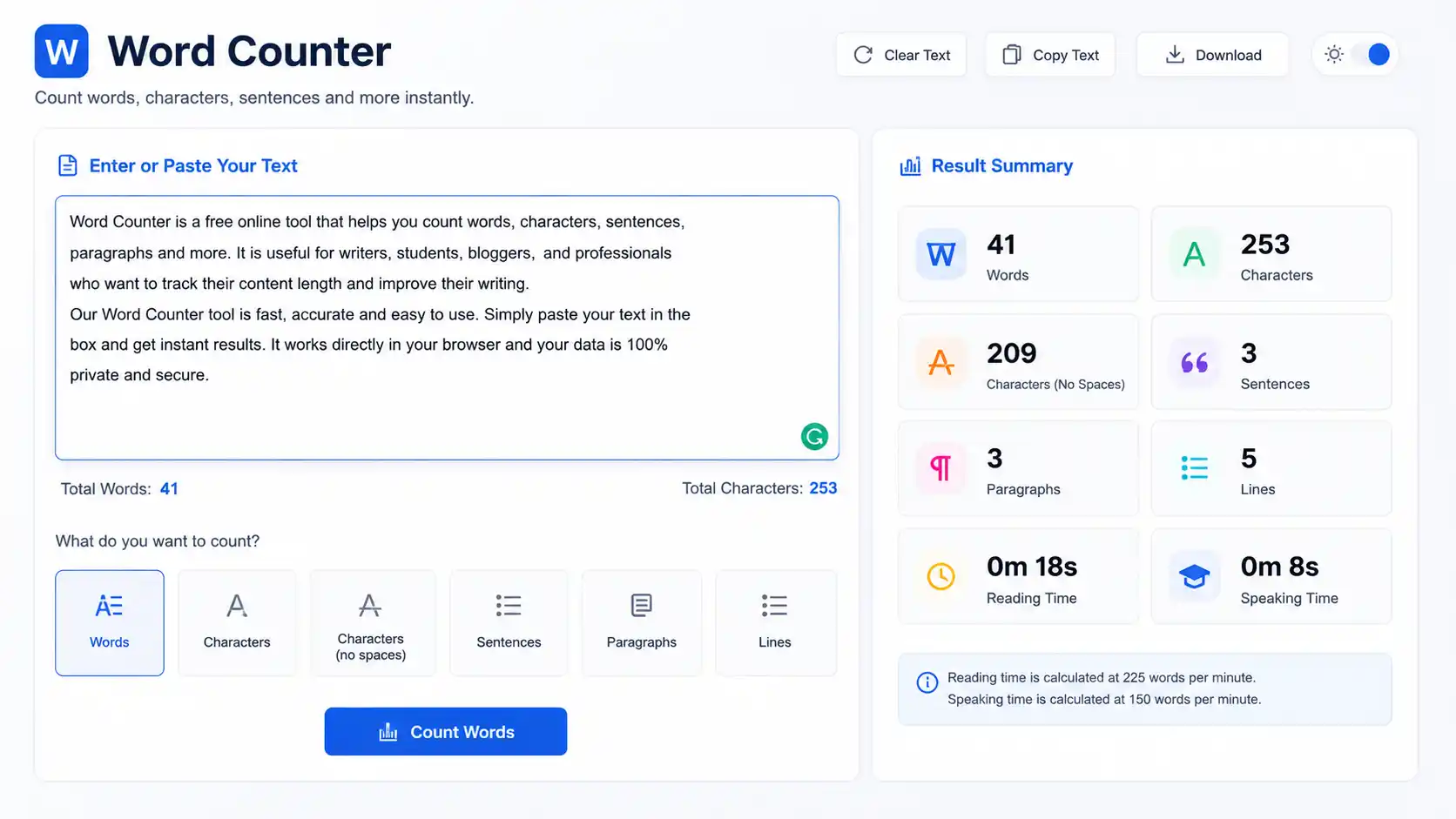
What Is a Word Counter?
A word counter is a tool that automatically calculates the number of words, characters, sentences, paragraphs, and reading time in a piece of text. You paste or type your content into the tool, and it instantly returns a precise count — eliminating the need to count manually and reducing the margin for error to zero.
Word counters are used by an enormous range of people: students hitting a minimum essay length, journalists staying within a column inch limit, novelists tracking daily writing progress, content marketers optimizing for SEO, academics meeting journal submission requirements, and copywriters fitting text into fixed-space designs.
What seems like a simple counting function is actually more nuanced than it appears. Different tools define “word” differently. Some count hyphenated compounds as one word; others count them as two. Some include numbers as words; others exclude them. Understanding how word counters work — and which rules apply in your context — is the difference between submitting an essay that meets requirements and one that does not.
How Does a Word Counter Work?
At the technical level, a word counter parses text by identifying word boundaries — the spaces, punctuation marks, and line breaks that separate one word from the next. The algorithm scans the entire string of characters, increments a counter each time it crosses a word boundary, and returns the total.
The Basic Algorithm
The most straightforward word-counting logic works as follows:
1. Trim leading and trailing whitespace from the text.
2. Split the text at every space, tab, or newline character.
3. Remove any empty segments created by consecutive spaces.
4. Count the remaining segments — each is one word.
In pseudocode:
words = text.strip().split()
word_count = len(words)
This is the same logic used by Microsoft Word, Google Docs, and most online word counters. It is fast, reliable, and consistent for standard prose.
What Counts as a Word?
The definition varies by tool and context, but the most widely accepted standard treats a word as any unbroken sequence of characters separated by whitespace. Under this definition:
- “hello” = 1 word
- “don’t” = 1 word (the apostrophe is internal, not a separator)
- “well-being” = 1 word (the hyphen is internal)
- “2026” = 1 word (numbers count)
- “U.S.A.” = 1 word (periods within abbreviations don’t split)
- “hello world” = 2 words
Academic institutions and publishers sometimes define words differently — for example, counting hyphenated compounds as two words, or excluding footnotes from body word counts. Always check the specific requirements of your submission context.
Character Counting
Beyond words, most counters also track characters. There are two character count modes:
Characters with spaces: Counts every character including spaces, tabs, and line breaks. Useful for social media platforms like Twitter/X (280 characters) and SMS messaging.
Characters without spaces: Counts only non-whitespace characters. Used in contexts where data storage or file size matters, or in certain academic citation styles.
Sentence and Paragraph Counting
Sentences are identified by terminal punctuation: periods, exclamation marks, and question marks. Paragraphs are counted by line breaks — specifically, the presence of a blank line between blocks of text.
Reading Time Estimation
Most modern word counters include an estimated reading time based on the widely cited average adult silent reading speed of 200–250 words per minute (WPM) for general content. Some tools use 238 WPM (the research-backed median for adult non-fiction reading).
Reading Time Formula:
Reading Time (minutes) = Total Word Count ÷ Reading Speed (WPM)
Example:
- Article word count: 2,000 words
- Reading speed: 238 WPM
- Reading time: 2,000 ÷ 238 = 8.4 minutes
Speaking time — useful for speeches and presentations — uses a different rate: 125–150 WPM for comfortable spoken delivery.
Word Count Standards Across Different Writing Contexts
Word count requirements are not universal. They vary dramatically by format, industry, and purpose. Understanding the conventions for your specific context prevents both the frustration of being under-length and the dilution of being unnecessarily padded.
Academic Writing
Academic word counts are among the strictest and most enforced. Institutions typically specify an acceptable range, and submissions outside that range may be penalized or rejected outright.
| Document Type | Typical Word Count Range |
|---|---|
| Short essay / response paper | 500–1,000 words |
| Undergraduate essay | 1,500–3,000 words |
| Graduate seminar paper | 3,000–6,000 words |
| Master’s thesis | 15,000–50,000 words |
| Doctoral dissertation | 70,000–100,000 words |
| Journal article | 3,000–8,000 words |
| Abstract | 150–300 words |
Most academic institutions follow the convention that word counts include the body text but exclude title pages, reference lists, appendices, and figure captions — unless explicitly stated otherwise. Always confirm with your institution or publisher.
Creative Writing and Fiction
Word count conventions in fiction are deeply embedded in publishing industry standards. Literary agents and publishers use word count as an immediate signal of genre fit and commercial viability.
| Fiction Category | Expected Word Count |
|---|---|
| Flash fiction | Under 1,000 words |
| Short story | 1,000–7,500 words |
| Novelette | 7,500–17,500 words |
| Novella | 17,500–40,000 words |
| Novel (general) | 70,000–100,000 words |
| Literary fiction | 80,000–110,000 words |
| Fantasy / Sci-Fi (debut) | 90,000–120,000 words |
| Young Adult (YA) | 60,000–90,000 words |
| Middle Grade | 25,000–40,000 words |
| Children’s picture book | 500–1,000 words |
Debut novelists who submit manuscripts significantly outside these ranges — especially overlength — face immediate skepticism from literary agents regardless of writing quality. Word count signals that a writer understands their market.
Journalism and Media
Print journalism operates on column inches and word counts tied directly to physical layout. Digital journalism loosened those constraints, but editorial standards remain.
| Format | Typical Word Count |
|---|---|
| News brief | 100–300 words |
| Standard news article | 400–800 words |
| Feature article | 800–2,000 words |
| Long-form / magazine feature | 2,000–10,000 words |
| Op-ed / opinion column | 600–900 words |
| Newsletter | 200–1,000 words |
Business and Professional Writing
| Document Type | Typical Word Count |
|---|---|
| Executive summary | 300–500 words |
| Business email | 50–200 words |
| Business proposal | 1,000–5,000 words |
| White paper | 2,000–10,000 words |
| Case study | 500–1,500 words |
| Press release | 300–500 words |
| LinkedIn article | 700–1,500 words |
Word Count and SEO: What the Data Actually Shows
For content creators and digital marketers, word count intersects with search engine optimization in ways that are frequently misunderstood. Let’s separate the evidence from the myths.
The Correlation vs. Causation Problem
Multiple studies — from Backlinko, Semrush, and Ahrefs — have found that longer content tends to rank higher on Google. Backlinko’s large-scale analysis found that the average first-page Google result contains approximately 1,447 words. Semrush data shows that articles over 3,000 words earn significantly more backlinks and shares than shorter pieces.
However, these correlations are routinely misinterpreted as causal relationships. Google does not rank content based on word count. What Google rewards is comprehensive, authoritative, well-structured content that fully satisfies search intent. Longer content often achieves this — but length itself is the byproduct, not the driver.
Padding an article with repetitive or low-value content to hit an arbitrary word count does not improve rankings. Google’s Helpful Content system, introduced and refined from 2022 onward, specifically targets content written to hit word targets rather than to genuinely serve readers.
What Word Count Actually Signals
Appropriate length is a signal of topical completeness. A 300-word article on a complex topic like “how a time clock rounding calculator works” signals to both readers and search engines that the content is superficial. A 2,500-word article on the same topic — covering definitions, formulas, legal rules, examples, and FAQs — signals depth and authority.
The right word count for any piece of content is the minimum number of words needed to fully answer the user’s question at the depth the topic requires. Not a word more for its own sake; not a word fewer at the expense of completeness.
Recommended SEO Word Counts by Intent
| Content Type | Recommended Word Count |
|---|---|
| Informational blog post | 1,500–2,500 words |
| Pillar / cornerstone content | 3,000–5,000+ words |
| Product page | 300–600 words |
| Category page | 500–1,000 words |
| FAQ page | 1,000–2,000 words |
| Local service page | 500–1,000 words |
| News / trending topic | 400–800 words |
How to Use a Word Counter Effectively
Knowing your word count is one thing; using that information to improve your writing is another. Here are the most effective strategies for leveraging word counter data.
Track Progress Toward a Target
Writers working toward a fixed target — a 5,000-word thesis chapter, a 1,000-word blog post, a 500-word executive summary — benefit from live word count displays that update as they type. Microsoft Word, Google Docs, Scrivener, and most online word counters offer this in real time.
Set intermediate milestones rather than watching only the final target. If you need 5,000 words, a visible counter hitting 1,000, 2,000, 3,000 removes the psychological weight of the entire goal and creates momentum through small wins.
Identify Padding and Redundancy
If your draft significantly exceeds your target word count, a word counter reveals the gap — but the editing work is identifying where those excess words live. Common sources of padding include:
- Throat-clearing introductions that delay the actual topic
- Redundant restatements of points already made
- Excessive use of adverbs and qualifiers (“very,” “really,” “quite,” “somewhat”)
- Passive voice constructions that add words without adding meaning
- Transition paragraphs that summarize what the reader just read
Run your text through a readability tool alongside your word counter to identify sentence-level bloat.
Use Character Count for Platform-Specific Writing
Different platforms impose different character limits:
| Platform | Character Limit |
|---|---|
| Twitter / X post | 280 characters |
| Google meta description | 155–160 characters |
| Google title tag | 50–60 characters |
| SMS text message | 160 characters (single), 1,600 (multi-part) |
| Instagram caption | 2,200 characters |
| LinkedIn post | 3,000 characters |
| YouTube title | 100 characters (70 recommended) |
| YouTube description | 5,000 characters |
Character-aware word counters that display both word and character counts simultaneously are indispensable for social media managers and SEO content writers who work across multiple platforms.
Estimate and Plan Reading Time
For content marketing and UX writing, reading time is often more actionable than raw word count. A “10-minute read” label on a blog post sets reader expectations and improves completion rates — readers who know what they’re committing to are more likely to finish.
Use reading time estimates to calibrate content length for your audience and format:
- Email newsletters: Aim for under 3 minutes (under 700 words) for highest open-to-read rates.
- Blog posts: 6–8 minutes (1,400–1,900 words) performs well for most informational content.
- Long-form guides: 15–20 minutes (3,500–5,000 words) is appropriate for pillar content where depth justifies the time investment.
- Social media captions: Under 30 seconds of reading time for maximum engagement.
Microsoft Word vs. Google Docs vs. Online Word Counters
The three most common environments for word counting each have subtle differences worth knowing.
Microsoft Word
Word’s built-in counter (displayed in the status bar at the bottom of the document) counts words, characters (with and without spaces), lines, paragraphs, and pages. It updates in real time as you type.
By default, Word includes text boxes, footnotes, and endnotes in the word count. If your academic institution or publisher excludes these, you need to manually subtract or configure the counting settings. Access the full count breakdown via Review → Word Count.
Google Docs
Google Docs counts words in real time (Tools → Word Count, or Ctrl+Shift+C). It allows you to display a live word count in the bottom toolbar while typing.
Google Docs excludes header and footer text from its word count — a key difference from Microsoft Word. If your document has significant header content, the counts between the two platforms may diverge.
Online Word Counters
Online tools like WordCounter.net, WordCount.com, and built-in counters on writing platforms (Hemingway Editor, Draft, Grammarly) offer additional analytics beyond raw counts: readability scores, keyword density, average sentence length, and most-used words. These are particularly useful for SEO writers who need to analyze content before publishing.
Most online counters process text client-side (in the browser) — meaning your content is not transmitted to a server. However, for sensitive documents, confirm the tool’s privacy policy before pasting confidential content.
Word Count Myths Debunked
Myth 1: More words always means better SEO. False. Google rewards relevance and depth, not length. A 500-word page that perfectly answers a simple query outranks a 3,000-word page that buries the answer in filler.
Myth 2: Word count tools are all the same. False. Different tools handle hyphenated words, numbers, abbreviations, and punctuation differently. For critical submissions, verify with the tool specified by the institution or publisher.
Myth 3: You should write to hit a word count target. False. Write to fully cover your topic; let the word count follow naturally. Then edit to remove everything that doesn’t serve the reader. The right length is always the result of the content, never the driver of it.
Myth 4: Character count and word count measure the same thing. False. Average English word length is approximately 5 characters, plus 1 for the space — about 6 characters per word. But actual word lengths vary enormously, and the two metrics serve different purposes for different platforms and contexts.
Frequently Asked Questions
How does a word counter count words?
A word counter splits text at whitespace characters (spaces, tabs, line breaks) and counts the resulting segments. Each unbroken sequence of characters separated by whitespace is counted as one word.
Does word count include punctuation?
Punctuation that is part of a word — apostrophes in contractions, periods in abbreviations, hyphens in compound words — does not break a word into separate units. Standalone punctuation marks (commas, periods at the end of sentences) are not counted as words.
What is the average reading time per word count?
At the standard adult reading speed of 238 words per minute, a 1,000-word article takes approximately 4.2 minutes to read; 2,000 words takes about 8.4 minutes; 3,000 words takes about 12.6 minutes.
Does Google care about word count for SEO?
Google does not use word count as a direct ranking factor. However, content that fully covers a topic tends to be longer, and that depth correlates with higher rankings. Write for completeness, not for a word count target.
What counts as a word in academic writing?
Most academic institutions count any sequence of characters separated by whitespace as a word, including numbers and abbreviations. Titles, reference lists, appendices, and figure captions are typically excluded from body word counts — but always confirm with your specific institution’s guidelines.
How do I check word count in Google Docs?
Go to Tools → Word Count, or press Ctrl+Shift+C (Windows) / Cmd+Shift+C (Mac). To display a live word count while typing, check the “Display word count while typing” box in the Word Count dialog.
What is the ideal word count for a blog post?
For informational blog posts targeting organic search, 1,500–2,500 words is the most commonly recommended range. Pillar content and comprehensive guides perform best at 3,000–5,000+ words. Short news or update posts can perform well at 400–800 words depending on the topic.
Conclusion
A word counter is one of the simplest tools a writer can use — and one of the most consistently underestimated. Beyond the raw number, word count data informs pacing, signals topical depth, drives platform compliance, and shapes the reader’s experience before they read a single sentence.
Whether you are writing a doctoral dissertation, crafting a tweet, drafting a landing page, or tracking daily progress toward a novel, understanding how word counters work and how to interpret their output makes you a more deliberate, efficient, and effective writer. The number at the bottom of the screen is not a finish line — it is a mirror that reflects how well your content serves its purpose.