What Is a Time Clock Estimator?
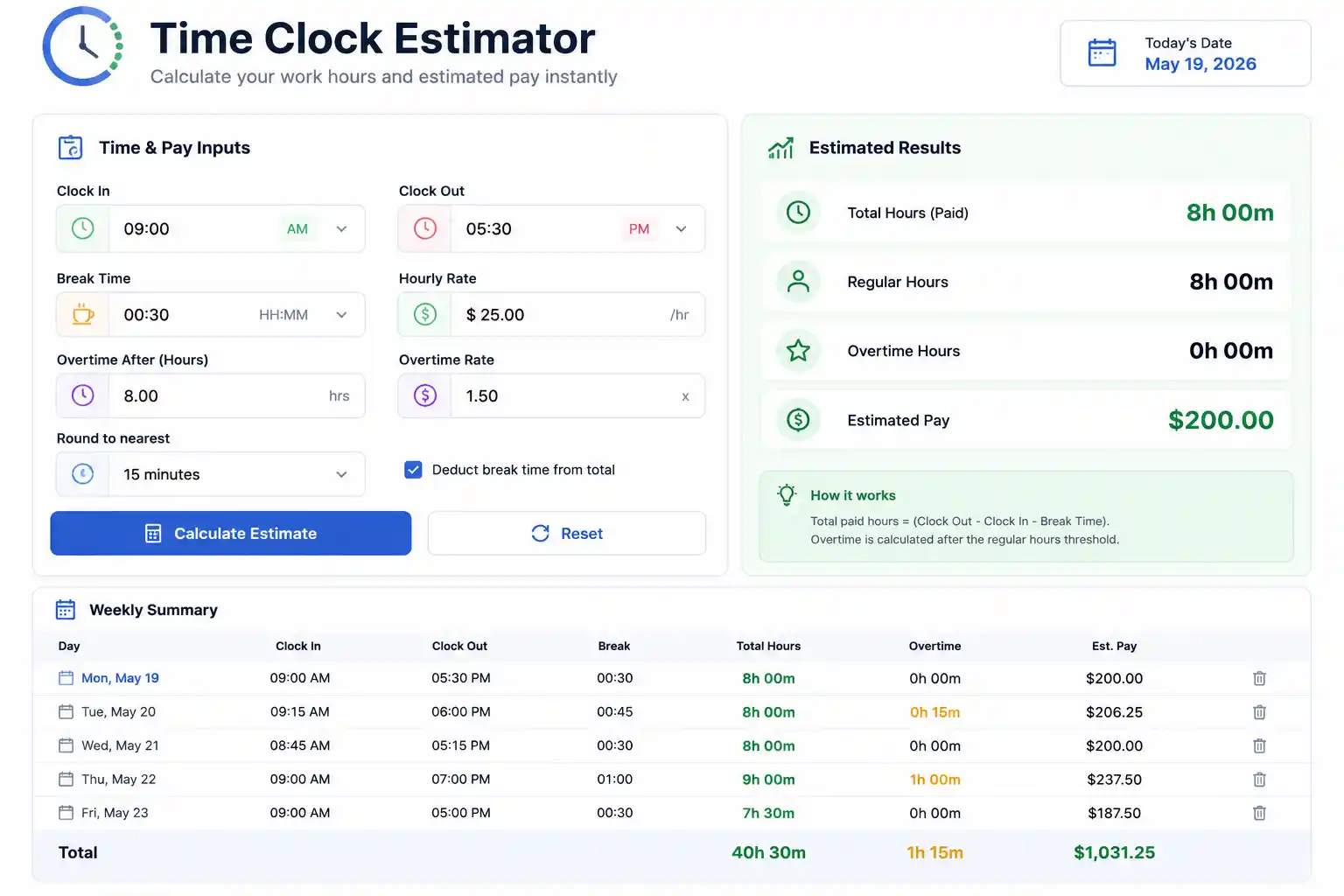
A time clock estimator is a planning and projection tool that calculates anticipated hours worked, labor costs, and payroll obligations for employees or teams — before the actual work period concludes. Where a time card calculator works backward from completed clock-in and clock-out records, a time clock estimator works forward from scheduled or partially recorded time data to project totals, flag potential overtime, and estimate gross pay.
The tool serves a different purpose than a timesheet calculator. A timesheet calculator tells you what happened. A time clock estimator tells you what is likely to happen — and what it will cost.
For payroll administrators, the estimator answers questions like: “If the crew works their scheduled hours through Friday, what will this week’s labor cost be?” For shift managers, it answers: “Is this employee going to hit overtime before the week ends?” For business owners running tight labor budgets, it answers: “How many hours can each department work this week before we exceed our payroll cap?”
Used well, a time clock estimator transforms payroll from a reactive accounting exercise into a proactive labor management function — one that prevents costly surprises before they become payroll line items.
The Core Formulas Behind a Time Clock Estimator
A time clock estimator combines confirmed hours already worked with projected hours still to be worked, then calculates estimated pay based on those totals.
Formula 1: Estimated Total Hours
Estimated Total Hours = Confirmed Hours Worked + Projected Remaining Hours
Where:
- Confirmed Hours Worked = hours already clocked and verified from completed shifts
- Projected Remaining Hours = scheduled hours yet to be worked in the current pay period
Formula 2: Estimated Overtime Hours
Estimated OT Hours = MAX(Estimated Total Hours − 40, 0)
For states with daily overtime (California, Colorado, Alaska, Nevada):
Daily OT Hours = MAX(Daily Scheduled Hours − 8, 0)
Estimated Daily OT = Sum of Daily OT Hours across the week
Formula 3: Estimated Regular Pay
Estimated Regular Pay = MIN(Estimated Total Hours, 40) × Regular Rate
Formula 4: Estimated Overtime Pay
Estimated OT Pay = Estimated OT Hours × (Regular Rate × 1.5)
Formula 5: Estimated Gross Pay
Estimated Gross Pay = Estimated Regular Pay + Estimated OT Pay
Formula 6: Estimated Labor Cost (for employers with multiple workers)
Total Estimated Labor Cost = Sum of Estimated Gross Pay for all employees in the period
How a Time Clock Estimator Differs from a Time Card Calculator
Understanding the distinction between these two tools prevents misapplication of each.
| Feature | Time Card Calculator | Time Clock Estimator |
|---|---|---|
| Data input | Completed clock-in/out records | Partial actuals + scheduled future shifts |
| Output | Exact hours worked and pay owed | Projected hours, overtime risk, and estimated pay |
| Time orientation | Backward-looking (what happened) | Forward-looking (what will happen) |
| Primary use | Payroll processing | Labor budget management, scheduling |
| Accuracy | Exact | Estimated (subject to schedule changes) |
| When used | After the pay period ends | During the pay period |
| Key question answered | “What do I owe?” | “What will I owe if the schedule holds?” |
Both tools are essential components of a complete payroll management system. The estimator informs decisions during the week; the calculator settles accounts at the end.
Step-by-Step Time Clock Estimation Examples
Example 1: Mid-Week Overtime Risk Assessment
Employee: Andre Williams, Production Technician Hourly Rate: $21.00 Current Day: Wednesday end of day Pay Period: Monday–Sunday
| Day | Status | Hours |
|---|---|---|
| Monday | Confirmed | 9.5 |
| Tuesday | Confirmed | 10.0 |
| Wednesday | Confirmed | 9.5 |
| Thursday | Scheduled | 9.0 |
| Friday | Scheduled | 8.5 |
| Saturday | Scheduled | 0 |
Confirmed Hours: 9.5 + 10.0 + 9.5 = 29.0 hours
Projected Remaining: 9.0 + 8.5 = 17.5 hours
Estimated Total: 29.0 + 17.5 = 46.5 hours

Estimated OT Hours: MAX(46.5 − 40, 0) = 6.5 hours
Estimated Regular Pay: 40 × $21.00 = $840.00
Estimated OT Pay: 6.5 × ($21.00 × 1.5) = 6.5 × $31.50 = $204.75
Estimated Gross Pay: $840.00 + $204.75 = $1,044.75
Manager action: With 6.5 estimated OT hours and it only being Wednesday, the manager can reduce Thursday’s scheduled hours from 9.0 to 6.5 (working 2.5 OT hours instead of 6.5) — saving $126.00 in overtime costs while keeping the employee’s weekly hours reasonable.
Example 2: Team Labor Cost Estimation for the Week
Scenario: A restaurant manager estimating Tuesday–Saturday labor costs as of Monday night.
| Employee | Mon (Confirmed) | Tue–Sat (Scheduled) | Est. Total | Rate | Est. Gross |
|---|---|---|---|---|---|
| Sarah K. | 6.0 | 28.0 | 34.0 | $16.00 | $544.00 |
| Marcus T. | 7.5 | 34.0 | 41.5 | $16.50 | $693.88 |
| Priya L. | 8.0 | 33.0 | 41.0 | $17.00 | $706.50 |
| James R. | 5.5 | 30.0 | 35.5 | $15.50 | $550.25 |
| Dana M. | 6.0 | 36.5 | 42.5 | $16.00 | $680.00 |
Marcus T. calculation (41.5 hours, $16.50/hour):
Regular Pay: 40 × $16.50 = $660.00
OT Pay: 1.5 × ($16.50 × 1.5) = 1.5 × $24.75 = $37.13
Estimated Gross: $697.13
Priya L. calculation (41.0 hours, $17.00/hour):
Regular Pay: 40 × $17.00 = $680.00
OT Pay: 1.0 × ($17.00 × 1.5) = 1.0 × $25.50 = $25.50
Estimated Gross: $705.50
Dana M. calculation (42.5 hours, $16.00/hour):
Regular Pay: 40 × $16.00 = $640.00
OT Pay: 2.5 × ($16.00 × 1.5) = 2.5 × $24.00 = $60.00
Estimated Gross: $700.00
Estimated Total Weekly Labor Cost: approximately $3,346
This estimate gives the manager a clear picture before the week unfolds — enough time to adjust Tuesday’s schedule if labor costs need to come in lower.
Example 3: Estimating Pay for a Partially Completed Shift
An employee started their shift at 8:00 AM. It is now 2:30 PM and they are scheduled to leave at 5:00 PM. They have a 30-minute unpaid lunch already taken. What are their estimated hours and pay for the day?
Hours already worked: 8:00 AM to 2:30 PM = 6.5 hours − 0.5 hours break = 6.0 hours confirmed
Remaining scheduled: 2:30 PM to 5:00 PM = 2.5 hours projected

Estimated Daily Hours = 6.0 + 2.5 = 8.5 hours
If weekly confirmed hours before today = 24.0 hours:
Estimated Weekly Total = 24.0 + 8.5 = 32.5 hours
Remaining scheduled shifts: Thursday (8.0 hrs) + Friday (7.5 hrs) = 15.5 hrs projected

Full Week Estimate = 32.5 + 15.5 = 48.0 hours
Estimated OT Hours = MAX(48.0 − 40, 0) = 8.0 hours
At $19.50/hour:
Regular Pay: 40 × $19.50 = $780.00
OT Pay: 8.0 × $29.25 = $234.00
Estimated Gross Pay: $1,014.00
Using a Time Clock Estimator for Overtime Prevention
One of the most valuable applications of a time clock estimator is proactive overtime management — identifying employees on track to exceed 40 hours before they actually do, while there is still time to adjust schedules.
The Overtime Risk Threshold
With five standard 8-hour workdays in a week (40 hours), an employee has zero scheduled overtime risk. But real schedules rarely deliver perfect 8-hour shifts. When confirmed hours through mid-week suggest a weekly total above 40, the estimator flags an overtime risk.
A practical threshold many managers use: if estimated total exceeds 38 hours by Wednesday evening, the employee is at elevated OT risk and needs schedule review before Thursday.
The Overtime Prevention Formula
Safe Remaining Hours = (40 − Confirmed Hours to Date)
Maximum Daily Hours (Thu/Fri) = Safe Remaining Hours ÷ Remaining Days
Example:
Employee has confirmed 28.5 hours through Wednesday:
Safe Remaining Hours = 40 − 28.5 = 11.5 hours
Maximum per remaining day (Thu + Fri) = 11.5 ÷ 2 = 5.75 hours/day
If originally scheduled for 9 hours Thursday and 9 hours Friday, the schedule needs to be reduced by 6.5 hours total to avoid overtime — or the employer accepts 6.5 hours of OT at 1.5× rate.
Cost Comparison: Overtime vs. Call-In
Managers can use the estimator to compare the cost of paying overtime against the cost of calling in an additional worker:
OT Cost = OT Hours × (Regular Rate × 1.5)
Call-In Cost = Call-In Hours × Call-In Worker's Rate + any applicable minimums
If the additional worker earns less than the overtime employee’s 1.5× rate, and the work can be distributed, the call-in may be more cost-effective. The time clock estimator makes this comparison concrete and immediate.
Time Clock Estimation for Salaried Non-Exempt Employees
Salaried non-exempt employees are entitled to overtime despite receiving a fixed weekly salary. A time clock estimator is particularly valuable for this group because their overtime entitlement is less visible — there is no obvious “hourly pay goes up” signal when they cross 40 hours.
Estimating Overtime Pay for Salaried Non-Exempt
Regular Rate = Weekly Salary ÷ 40
Estimated OT Pay = Estimated OT Hours × (Regular Rate × 1.5)
Estimated Total Pay = Weekly Salary + Estimated OT Pay
Example:
- Weekly salary: $760.00 (intended to cover 40 hours)
- Estimated total hours: 46
- Regular rate: $760.00 ÷ 40 = $19.00/hour
- Estimated OT hours: 46 − 40 = 6 hours
- Estimated OT pay: 6 × ($19.00 × 1.5) = 6 × $28.50 = $171.00
- Estimated Total Pay: $760.00 + $171.00 = $931.00
For payroll planning purposes, this means a “salaried” employee’s actual weekly cost can vary significantly from their nominal salary — a fact that surprises many smaller employers who assume salaried status caps labor cost at the fixed salary amount.
Time Clock Estimator for Project-Based Labor Costing
Beyond payroll, time clock estimators serve a critical function in project labor costing — projecting the total labor cost of a project based on hours worked to date and remaining estimated work.
Project Labor Cost Formula
Estimated Total Project Labor Cost =
  (Hours Worked to Date × Hourly Labor Rate) +
  (Estimated Remaining Hours × Hourly Labor Rate)
Or more simply:
Estimated Total Labor Cost = Estimated Total Project Hours × Weighted Average Labor Rate
Project Labor Estimation Example
Project: Commercial HVAC installation Crew: 3 technicians
| Technician | Rate | Hours Worked | Est. Remaining | Est. Total Hours | Est. Cost |
|---|---|---|---|---|---|
| Lead Tech | $42.00 | 28.0 | 22.0 | 50.0 | $2,100.00 |
| Tech 2 | $34.00 | 26.5 | 20.0 | 46.5 | $1,581.00 |
| Tech 3 | $28.00 | 24.0 | 18.0 | 42.0 | $1,176.00 |
Note: Tech 2 and Tech 3 will each exceed 40 hours, triggering overtime:
Tech 2 OT calculation:
Regular Pay: 40 × $34.00 = $1,360.00
OT Pay: 6.5 × ($34.00 × 1.5) = 6.5 × $51.00 = $331.50
Estimated Labor Cost: $1,691.50
Tech 3 OT calculation:
Regular Pay: 40 × $28.00 = $1,120.00
OT Pay: 2.0 × ($28.00 × 1.5) = 2.0 × $42.00 = $84.00
Estimated Labor Cost: $1,204.00
Estimated Total Project Labor Cost: $2,100.00 + $1,691.50 + $1,204.00 = $4,995.50
If the original project labor budget was $4,500.00, the estimator reveals a $495.50 overrun in time to renegotiate scope, adjust crew composition, or inform the client — rather than discovering it after the invoice is issued.
Building a Time Clock Estimator in Excel
A functional time clock estimator can be built in Excel with a structured template that separates confirmed hours from scheduled hours and automatically calculates overtime risk and estimated gross pay.
Recommended Column Structure
| Column | Label | Content |
|---|---|---|
| A | Employee Name | Text |
| B | Hourly Rate | Dollar value |
| C | Mon Confirmed | Decimal hours |
| D | Tue Confirmed | Decimal hours |
| E | Wed Confirmed | Decimal hours |
| F | Thu Scheduled | Decimal hours |
| G | Fri Scheduled | Decimal hours |
| H | Sat Scheduled | Decimal hours |
| I | Total Confirmed | =SUM(C:E) |
| J | Total Scheduled | =SUM(F:H) |
| K | Estimated Total | =I+J |
| L | Est. OT Hours | =MAX(K-40,0) |
| M | Est. Regular Pay | =MIN(K,40)*B |
| N | Est. OT Pay | =L*(B*1.5) |
| O | Est. Gross Pay | =M+N |
Conditional Formatting for Overtime Alerts
Apply conditional formatting to column K (Estimated Total) to highlight cells in red when the value exceeds 38 (approaching overtime) and orange when it exceeds 40 (confirmed overtime):
Rule 1: =K2>40 → Red fill (overtime confirmed)
Rule 2: =AND(K2>=38,K2<=40) → Orange fill (overtime risk)
Rule 3: =K2<38 → Green fill (no risk)
This transforms the spreadsheet into a real-time visual dashboard that flags overtime risk across the entire team at a glance.
Dynamic Current-Day Formula
To automatically separate confirmed from scheduled hours based on today’s date:
=IF(WEEKDAY(TODAY())>2, C2, 0)
This formula includes Monday’s hours (column C) only if today is Tuesday or later — allowing the template to update dynamically as the week progresses without manual re-entry.
Common Time Clock Estimation Errors
Error 1: Treating Scheduled Hours as Confirmed
The most fundamental estimation error: assuming every scheduled shift will be worked exactly as planned. Real-world schedule adherence varies — employees call out, shifts get cut, emergencies extend hours. A time clock estimator is a projection based on the best available information, not a guarantee.
The mitigation: apply a historical schedule adherence rate to projected hours when precision matters. If your team averages 95% schedule adherence, multiply projected hours by 0.95 for a more realistic estimate.
Error 2: Ignoring Break Deductions in Projections
Projected remaining hours should reflect net paid hours, not gross shift duration. A scheduled 9-hour shift with a 30-minute unpaid break contributes 8.5 hours to the total — not 9.0. Failing to account for breaks inflates estimated hours and pay.
Error 3: Forgetting State Daily Overtime in Estimates
For California, Colorado, Alaska, and Nevada employees, the estimator must calculate daily overtime — not just weekly totals. An employee with four 10-hour days works only 40 total hours but earns 8 hours of daily overtime premium under California law. A weekly-only estimator will miss this entirely.
Error 4: Not Updating Estimates as Actuals Come In
An estimate calculated Monday morning becomes less accurate by Thursday if it is not updated with actual confirmed hours from each passing day. A time clock estimator should be a live document refreshed daily with confirmed shift data — not a static beginning-of-week projection that the team forgets to revisit.
Error 5: Using Gross Shift Duration Instead of Net Paid Hours
When pulling scheduled hours from a scheduling system, verify whether the system reports gross shift duration (including unpaid breaks) or net paid hours. Using gross duration consistently overstates estimated hours and pay.
Frequently Asked Questions
What is a time clock estimator used for?
A time clock estimator projects total hours worked, overtime risk, and estimated gross pay based on confirmed hours to date and scheduled remaining shifts. It is used for proactive overtime management, labor budget tracking, and project cost estimation.
How is a time clock estimator different from a timesheet calculator?
A timesheet calculator computes exact pay from completed time records. A time clock estimator projects likely hours and pay from a combination of confirmed actuals and scheduled future shifts — it is forward-looking, not backward-looking.
How do you estimate remaining hours in a pay period?
Sum the scheduled hours for all shifts not yet worked in the current pay period. Subtract any applicable unpaid break time to get net projected hours. Add this to confirmed hours already worked to get the estimated period total.
Can a time clock estimator prevent overtime?
Yes. By identifying employees on track to exceed 40 hours before they cross the threshold, a time clock estimator gives managers a window to adjust schedules, redistribute work, or call in additional staff — preventing overtime costs before they are incurred rather than discovering them on the payroll report.
How accurate is a time clock estimate?
Accuracy depends on how closely the actual schedule is followed. For stable, predictable workforces, mid-week estimates can be accurate within 5–10%. For variable or call-out-prone environments, estimates carry more uncertainty and should be treated as planning ranges rather than precise projections.
How do you calculate estimated labor cost for a team?
Estimate gross pay for each employee individually using their confirmed hours, scheduled remaining hours, and hourly rate. Apply overtime calculations where the estimated total exceeds 40 hours. Sum all individual estimates for the total team labor cost projection.
Does a time clock estimator account for overtime?
It should. A properly built time clock estimator automatically separates regular and overtime hours once the estimated total exceeds 40 (or 8 per day in daily overtime states), applying the 1.5× rate to projected overtime hours.
Can I build a time clock estimator in Excel?
Yes. A structured Excel template with columns for confirmed hours, scheduled hours, automatic totaling, and MIN/MAX formulas for regular and overtime pay calculation can function as a complete time clock estimator. Adding conditional formatting for overtime risk thresholds makes it a real-time management tool.
Conclusion
A time clock estimator is a labor management tool that operates in the space between what has happened and what is about to — giving payroll administrators, managers, and business owners the forward visibility to make decisions about scheduling, cost, and compliance before those decisions become constraints.
The formulas are straightforward extensions of basic payroll math: confirmed hours plus projected hours equals estimated total; estimated total minus 40 equals estimated overtime; regular and overtime hours multiplied by their respective rates equals estimated gross pay. What makes the estimator valuable is not the arithmetic — it is the timing. Applied mid-week, mid-project, or mid-period, it transforms payroll data from a historical record into a management instrument.
The difference between a business that controls its labor costs and one that is perpetually surprised by them is often nothing more than the consistent use of a time clock estimator throughout the pay period.