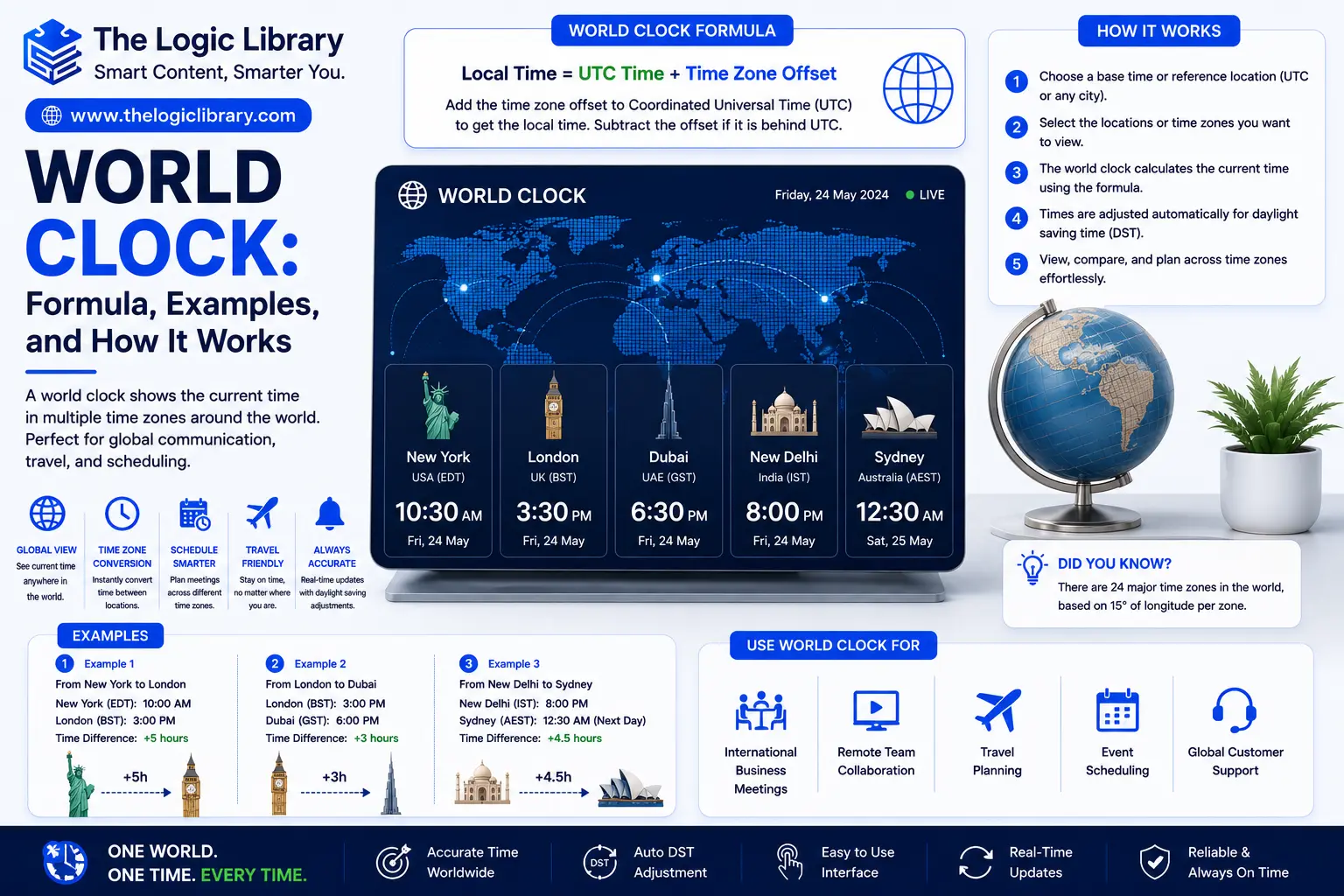
A World Clock is an essential timekeeping tool that displays the current time in multiple cities, countries, and time zones around the globe. In an increasingly connected world, businesses, travelers, remote teams, international students, and global organizations rely on World Clocks to coordinate meetings, manage schedules, and communicate across different regions. Whether you’re checking the time in London while living in New York or scheduling a virtual meeting between teams in Tokyo and Sydney, a World Clock provides accurate and real-time time zone information.
Understanding how a World Clock works, the formulas behind time zone calculations, and practical examples can help you navigate international communication more effectively. This guide explains everything you need to know about World Clocks, including their formula, applications, advantages, and real-world use cases.
What Is a World Clock?
A World Clock is a clock system that displays the current local time for multiple locations worldwide. It uses time zone data and Coordinated Universal Time (UTC) as a reference point to calculate local times accurately.
Unlike a standard clock that shows only one location’s time, a World Clock can display:
- Multiple cities simultaneously
- Different time zones
- UTC offsets
- Daylight Saving Time adjustments
- International date changes
World Clocks are commonly available as:
- Online tools
- Mobile applications
- Desktop widgets
- Smart devices
- Digital displays
- Business scheduling platforms
Their primary purpose is to help people understand and compare times across different regions.
How a World Clock Works
A World Clock operates by using UTC as the global time standard.
The process follows these steps:
- Obtain the current UTC time.
- Identify the target location’s UTC offset.
- Apply the offset to UTC.
- Adjust for Daylight Saving Time if applicable.
- Display the resulting local time.
For example:
UTC Time:
12:00 PM
New York Offset:
UTC -5
Calculation:
12:00 PM - 5 Hours
Result:
7:00 AM
The World Clock continuously updates these calculations to display accurate real-time information.
World Clock Formula
The fundamental World Clock formula is:
Local Time = UTC Time + UTC Offset
This formula determines the local time in any region of the world.
Standard World Clock Formula
Local Time = UTC + Time Zone Offset
Where:
- UTC = Coordinated Universal Time
- Time Zone Offset = Positive or negative hour difference from UTC
The result provides the current local time for a specific location.
Understanding UTC in a World Clock
UTC (Coordinated Universal Time) serves as the global reference point for all time zones.
Important facts:
- UTC does not change seasonally.
- UTC is used worldwide as the standard time reference.
- Every time zone is defined relative to UTC.
Examples:
| Time Zone | UTC Offset |
|---|---|
| Pakistan Standard Time (PKT) | UTC +5 |
| India Standard Time (IST) | UTC +5:30 |
| London (GMT) | UTC +0 |
| New York (EST) | UTC -5 |
| Los Angeles (PST) | UTC -8 |
| Tokyo (JST) | UTC +9 |
| Sydney (AEST) | UTC +10 |
A World Clock uses these offsets to calculate local times accurately.
Example of the World Clock Formula
Suppose UTC time is:
10:00 AM
Tokyo operates on:
UTC +9
Using the formula:
Local Time = UTC + Offset
Calculation:
10:00 AM + 9 Hours
Result:
7:00 PM
The World Clock would display 7:00 PM in Tokyo.
World Clock Example for International Meetings
Imagine a company with employees in:
- New York
- London
- Dubai
- Singapore
Meeting Time:
2:00 PM UTC
Using time zone offsets:
| City | UTC Offset | Local Time |
|---|---|---|
| New York | UTC -5 | 9:00 AM |
| London | UTC +0 | 2:00 PM |
| Dubai | UTC +4 | 6:00 PM |
| Singapore | UTC +8 | 10:00 PM |
A World Clock helps organizers identify suitable meeting times for all participants.
World Clock Example for Travelers
A traveler flying from Pakistan to Japan needs to adjust schedules.
Current Time in Pakistan:
10:00 AM
Pakistan Time Zone:
UTC +5
Japan Time Zone:
UTC +9
Difference:
9 - 5 = 4 Hours
Result:
10:00 AM + 4 Hours = 2:00 PM
The World Clock immediately shows the time difference, helping travelers plan activities and avoid confusion.
World Clock Example for Global Businesses
Businesses operating internationally depend on World Clocks for customer support and team collaboration.
Example:
A company headquartered in London manages support centers in:
- Toronto
- Dubai
- Singapore
Current UTC:
8:00 AM
World Clock Results:
| Location | Local Time |
|---|---|
| London | 8:00 AM |
| Toronto | 3:00 AM |
| Dubai | 12:00 PM |
| Singapore | 4:00 PM |
Managers can determine which offices are currently operational.
Why World Clocks Are Important
World Clocks play a critical role in modern communication.
Key benefits include:
- Accurate global scheduling
- Better international collaboration
- Reduced time zone confusion
- Improved travel planning
- Enhanced productivity
- Efficient customer support operations
Without a World Clock, coordinating activities across continents becomes much more difficult.
Types of World Clocks
Different World Clocks serve different purposes.
Digital World Clock
Displays multiple time zones digitally.
Features:
- Real-time updates
- Multiple city displays
- Automatic synchronization
Commonly found on websites and mobile apps.
Analog World Clock
Uses traditional clock faces for different locations.
Features:
- Visual time comparison
- Elegant design
- Office wall displays
Popular in corporate environments.
Online World Clock
Accessible through web browsers.
Benefits:
- No installation required
- Automatic updates
- Global accessibility
Widely used by travelers and remote workers.
Mobile World Clock
Built into smartphones and smartwatches.
Advantages:
- Portable
- Convenient
- Easy city management
Most modern devices include this feature.
Daylight Saving Time and World Clocks
One of the most important functions of a World Clock is handling Daylight Saving Time (DST).
DST shifts local clocks forward or backward during specific periods of the year.
Example:
New York:
Standard Time:
UTC -5
During DST:
UTC -4
A World Clock automatically applies these adjustments, ensuring accurate local time displays.
International Date Line and World Clocks
The International Date Line creates date changes between neighboring regions.
For example:
Tokyo:
Monday 10:00 AM
Los Angeles:
Sunday 6:00 PM
Although both locations exist simultaneously, they are on different calendar days.
World Clocks automatically account for these date differences.
Common World Clock Calculations
Time Difference Formula
To calculate the difference between two locations:
Time Difference = UTC Offset A − UTC Offset B
Example:
Pakistan:
UTC +5
New York:
UTC -5
Calculation:
5 − (-5) = 10 Hours
Pakistan is 10 hours ahead of New York.
Local Time Conversion Formula
Target Local Time = Current Local Time + Time Difference
This formula helps convert time between regions quickly.
Applications of a World Clock
World Clocks are used across many industries.
Business Operations
Global companies coordinate employees and clients worldwide.
Remote Work
Distributed teams schedule meetings effectively.
Travel Planning
Travelers adjust to local time zones.
Financial Markets
Investors monitor stock exchanges across different countries.
Education
International students attend virtual classes across time zones.
Customer Support
Support teams provide coverage around the clock.
Advantages of Using a World Clock
Accurate Scheduling
Avoid missed meetings and scheduling conflicts.
Better Global Communication
Coordinate with international colleagues and clients more effectively.
Improved Productivity
Reduce time spent calculating time differences manually.
Travel Convenience
Quickly understand local times during international trips.
Automatic Updates
Modern World Clocks update instantly when time zones or DST changes occur.
Common Mistakes When Using a World Clock
Ignoring Daylight Saving Time
Not accounting for DST can cause scheduling errors.
Confusing AM and PM
Using incorrect formats may lead to missed appointments.
Forgetting Date Changes
Cities on opposite sides of the International Date Line may be on different days.
Using Outdated Time Zone Data
Older software may not reflect current time zone regulations.
Modern World Clocks solve these issues through automatic updates.
World Clock vs Standard Clock
| Feature | World Clock | Standard Clock |
|---|---|---|
| Multiple Time Zones | Yes | No |
| Global Scheduling | Excellent | Limited |
| UTC Support | Yes | No |
| DST Handling | Automatic | Manual |
| International Use | High | Low |
| Travel Assistance | Excellent | Limited |
A World Clock provides significantly more functionality than a standard local clock.
Frequently Asked Questions
What is a World Clock?
A World Clock is a tool that displays the current local time in multiple cities or time zones around the world.
What is the World Clock formula?
The basic formula is:
Local Time = UTC Time + UTC Offset
Why do businesses use World Clocks?
Businesses use World Clocks to coordinate meetings, manage remote teams, and communicate effectively across time zones.
Does a World Clock adjust for Daylight Saving Time?
Yes. Modern World Clocks automatically account for DST changes.
Can a World Clock display multiple cities?
Yes. Most World Clocks allow users to view dozens of cities simultaneously.
Is UTC the same as GMT?
For most practical purposes, UTC and GMT are treated similarly, although UTC is the modern international time standard.
Conclusion
A World Clock is an indispensable tool for managing time across different countries and time zones. By using the simple formula Local Time = UTC Time + UTC Offset, World Clocks provide accurate and real-time local times anywhere in the world. Whether you’re coordinating international meetings, planning travel, managing remote teams, monitoring global markets, or communicating with friends and family overseas, a World Clock eliminates confusion and improves efficiency. As globalization continues to connect people and businesses worldwide, understanding how World Clocks work has become an increasingly valuable skill for personal and professional success.