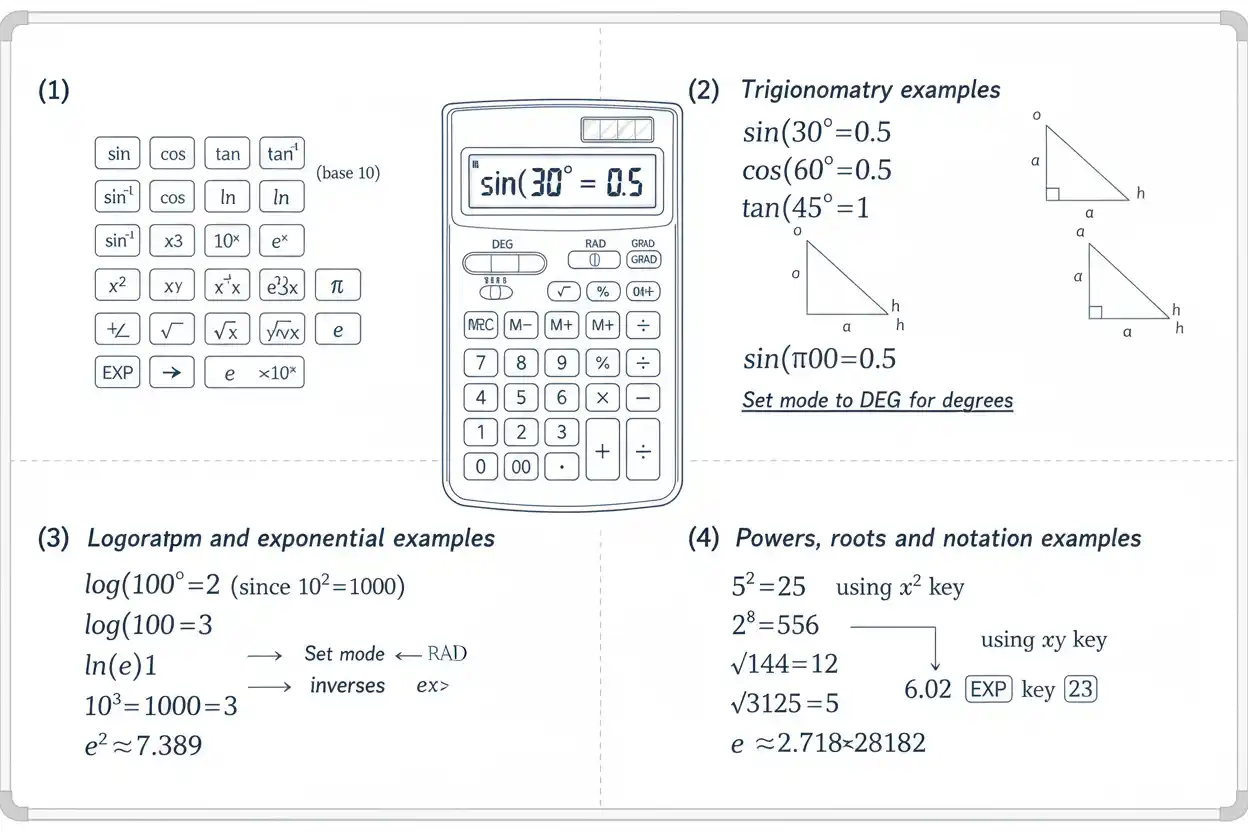

Scientific functions extend ordinary arithmetic with operations such as trigonometric functions, logarithms, powers, roots, exponentials, constants, inverse functions, and angle conversions.
Common scientific functions include:
sin(x), cos(x), tan(x)
sin⁻¹(x), cos⁻¹(x), tan⁻¹(x)
log(x)
ln(x)
eˣ
10ˣ
x², xʸ
√x, ⁿ√x
π and e
Scientific calculators also commonly provide parentheses, memory, exponent entry, reciprocal, factorial, remainder or modulo operations, and controls for degrees and radians.
The mathematics behind each function matters more than the key itself. A calculator can evaluate an expression accurately only when the correct function, domain, angle mode, and order of operations are used.
What Are Scientific Functions?
Scientific functions are mathematical operations commonly needed beyond addition, subtraction, multiplication, and division.
They are used in:
algebra,
geometry,
trigonometry,
logarithms,
exponential models,
statistics,
physics,
engineering,
and many other quantitative fields.
For example:
sin(30°) = 0.5
log₁₀(1000) = 3
ln(e²) = 2
√81 = 9
Each operation answers a different mathematical question.
Trigonometric Functions
The three primary trigonometric functions are:
sin(x)
cos(x)
tan(x)
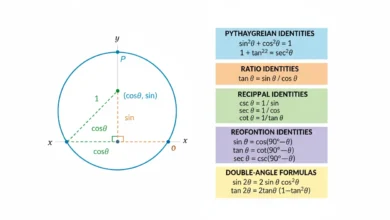
For a right triangle with angle θ:
sin(θ) = opposite/hypotenuse
cos(θ) = adjacent/hypotenuse
tan(θ) = opposite/adjacent
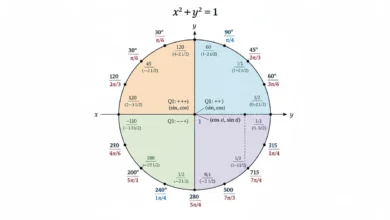
These ratios also extend beyond triangles through the unit-circle definitions of trigonometry.
Sine
For angle θ:
sin(θ) = opposite/hypotenuse
For example, in degrees:
sin(30°) = 1/2
= 0.5
Other familiar values include:
sin(0°) = 0
sin(90°) = 1
The sine function is especially common in periodic and oscillating models.
Cosine
For a right triangle:
cos(θ) = adjacent/hypotenuse
For example:
cos(60°) = 1/2
= 0.5
Also:
cos(0°) = 1
cos(90°) = 0
Sine and cosine are related by:
sin²(θ) + cos²(θ) = 1
Tangent
The tangent function is:
tan(θ) = opposite/adjacent
It is also:
tan(θ) = sin(θ)/cos(θ)
provided:
cos(θ) ≠ 0
For example:
tan(45°) = 1
Because:
cos(90°) = 0
the tangent of 90° is undefined.
Degrees vs. Radians
A scientific calculator must use the correct angle mode.
A full rotation is:
360°
or:
2π radians
Therefore:
180° = π radians
and:
1° = π/180 radians
To convert degrees to radians:
Radians = Degrees × π/180
To convert radians to degrees:
Degrees = Radians × 180/π
Example: Degree and Radian Modes
Suppose you evaluate:
sin(30)
In degree mode:
sin(30°) = 0.5
In radian mode:
sin(30 radians) ≈ -0.988
These are completely different inputs.
An unexpected trigonometric result should therefore prompt an immediate check of the calculator’s angle mode.
Inverse Trigonometric Functions
Inverse trigonometric functions recover an angle from a trigonometric ratio.
Common notation includes:
sin⁻¹(x)
cos⁻¹(x)
tan⁻¹(x)
These mean inverse functions, not reciprocals.
For example:
sin⁻¹(0.5) = 30°
in degree mode.
Inverse Sine
If:
sin(θ) = 0.5
then:
θ = sin⁻¹(0.5)
For the principal inverse-sine value:
θ = 30°
or:
θ = π/6 radians
The principal range for real inverse sine is:
-90° ≤ θ ≤ 90°
or:
-π/2 ≤ θ ≤ π/2
Inverse Cosine
If:
cos(θ) = 0.5
then:
cos⁻¹(0.5) = 60°
The principal real range is:
0° ≤ θ ≤ 180°
or:
0 ≤ θ ≤ π
Inverse Tangent
If:
tan(θ) = 1
then:
tan⁻¹(1) = 45°
The principal real range is:
-90° < θ < 90°
or:
-π/2 < θ < π/2
Inverse Trig Is Not Reciprocal Trig
The notation:
sin⁻¹(x)
means inverse sine.
It does not mean:
1/sin(x)
The reciprocal of sine is:
csc(x)
Similarly:
1/cos(x) = sec(x)
and:
1/tan(x) = cot(x)
This distinction prevents one of the most common scientific-function mistakes.
Common Reciprocal Functions
The reciprocal trigonometric functions are:
csc(x) = 1/sin(x)
sec(x) = 1/cos(x)
cot(x) = 1/tan(x)
For example:
sin(30°) = 1/2
so:
csc(30°) = 2
Not every basic calculator has dedicated csc, sec, or cot buttons, but each can be calculated through reciprocals.
Common Logarithm
The common logarithm uses base:
10
and is usually written:
log(x) = log₁₀(x)
For example:
log(1000) = 3
because:
10³ = 1000
Similarly:
log(0.01) = -2
because:
10^-2 = 0.01
Natural Logarithm
The natural logarithm uses base:
e
where:
e ≈ 2.718281828…
It is written:
ln(x) = logₑ(x)
For example:
ln(e) = 1
and:
ln(e⁵) = 5
The natural logarithm is particularly important in continuous growth, calculus, and exponential models.
Logarithms Reverse Exponents
The defining logarithm relationship is:
log_b(x) = y ⇔ bʸ = x
For example:
log₂(32) = 5
because:
2⁵ = 32
Thus logarithms answer:
What exponent produces this number?
Logarithm Domain
For real logarithms:
x > 0
Therefore:
log(10)
is real.
log(0)
is undefined.
log(-5)
has no real value.
This domain restriction applies to both common and natural logarithms.
Change-of-Base Formula
If a calculator provides only log and ln, logarithms with other bases can still be evaluated.
For:
b > 0
b ≠ 1
x > 0
use:
log_b(x) = log(x)/log(b)
or:
log_b(x) = ln(x)/ln(b)
For example:
log₂(32) = log(32)/log(2)
= 5
Example: log₃(81)
Use:
log₃(81) = log(81)/log(3)
Since:
3⁴ = 81
the result is:
4
The change-of-base calculation reproduces the exact exponent.
Logarithm Product Rule
For positive a and b:
log(ab) = log(a) + log(b)
For example:
log(100 × 10)
= log(100) + log(10)
= 2 + 1
= 3
which agrees with:
log(1000) = 3
Logarithm Quotient Rule
For positive a and b:
log(a/b) = log(a) – log(b)
For example:
log(1000/10)
= 3 – 1
= 2
and:
log(100) = 2
Logarithm Power Rule
For appropriate positive a:
log(aᵏ) = k log(a)
For example:
log(10⁵) = 5 log(10)
= 5
These logarithm identities allow products, quotients, and powers to be transformed algebraically.
Powers on a Scientific Calculator
Common power functions include:
x²
x³
xʸ
10ˣ
eˣ
For example:
7² = 49
4³ = 64
2⁸ = 256
10^-3 = 0.001
The general xʸ function allows arbitrary supported bases and exponents.
Negative Exponents
A negative exponent represents a reciprocal:
a^-n = 1/aⁿ
for:
a ≠ 0
For example:
10^-4 = 1/10⁴
= 0.0001
This relationship is fundamental when working with very small values and scientific notation.
Fractional Exponents
Fractional exponents represent roots.
For positive real a:
a^(1/n) = ⁿ√a
For example:
81^(1/2) = √81
= 9
and:
27^(1/3) = ∛27
= 3
The broader roots framework explains the domain differences between even and odd indices.
Combining Powers and Roots
The expression:
a^(m/n)
can often be interpreted as:
(ⁿ√a)ᵐ
For example:
8^(2/3)
First:
∛8 = 2
Then:
2² = 4
Therefore:
8^(2/3) = 4
Parentheses are important when entering fractional exponents.
Square Function
A dedicated:
x²
button computes:
x × x
For example:
13² = 169
If the input is negative, parentheses may matter:
(-5)² = 25
while an expression entered as:
-5²
is ordinarily interpreted as:
-(5²)
= -25
because exponentiation occurs before the leading negative sign.
Square Root Function
The square-root function calculates:
√x
For example:
√144 = 12
For real calculations:
x ≥ 0
is required.
Thus:
√(-9)
does not have a real value.
Cube Root and nth Root
Some calculators provide:
∛x
and:
ⁿ√x
directly.
Others use fractional powers.
For example:
∛125 = 125^(1/3)
= 5
and:
⁵√32 = 32^(1/5)
= 2
Reciprocal Function
The reciprocal of nonzero x is:
1/x
For example:
1/8 = 0.125
A calculator may label this function:
x⁻¹
This exponent notation should not be confused with an inverse function such as sin⁻¹.
For ordinary numbers:
x⁻¹ = 1/x
The Constant π
The constant:
π ≈ 3.141592653589793…
represents the ratio of a circle’s circumference to its diameter.
Common formulas include:
Circumference = 2πr
Area = πr²
Using a dedicated π constant retains more precision than manually entering:
3.14
Example Using π
For a circle with radius:
r = 5
area:
A = πr²
= π × 25
≈ 78.5398
Rounded to two decimal places using the relevant rounding rules:
A ≈ 78.54
Using the stored π value avoids unnecessary early approximation.
The Constant e
The mathematical constant:
e ≈ 2.718281828459045…
is the base of natural logarithms.
It appears in exponential functions such as:
y = eˣ
and continuous-growth relationships.
Examples:
e⁰ = 1
ln(e) = 1
ln(eˣ) = x
for appropriate real x.
Exponential Function eˣ
The function:
eˣ
grows rapidly for positive x.
Examples:
e⁰ = 1
e¹ ≈ 2.71828
e² ≈ 7.38906
For negative exponents:
e^-1 = 1/e
≈ 0.367879
The exponential and natural logarithm functions are inverses.
Powers of 10
The function:
10ˣ
is the inverse of the common logarithm.
For example:
10³ = 1000
and:
log(1000) = 3
Likewise:
10^-2 = 0.01
and:
log(0.01) = -2
Factorial Function
Many scientific calculators include:
n!
For a nonnegative integer n:
n! = n × (n-1) × … × 1
For example:
5! = 120
0! = 1
Factorials grow rapidly and commonly appear in permutations, combinations, probability, and some sequence sums.
Parentheses
Parentheses control grouping.
Compare:
(2+3)²
and:
2+3²
First:
(2+3)² = 5² = 25
Second:
2+3² = 2+9 = 11
The scientific function itself may be correct, but incorrect grouping produces an incorrect expression.
Nested Scientific Functions
Functions can be nested.
For example:
ln(√e⁴)
Evaluate inside outward.
First:
e⁴
Then:
√(e⁴) = e²
Then:
ln(e²) = 2
Therefore:
ln(√e⁴) = 2
The same inside-out evaluation principle applies to nested roots, logarithms, and trigonometric functions.
Scientific Notation Entry
Scientific calculators commonly provide an exponent-entry key such as:
EXP
EE
or similar notation.
To represent:
6.02 × 10²³
the calculator may store it internally as:
6.02E23
The E23 portion means:
×10²³
It does not mean multiplication by the mathematical constant e.
e vs. E Notation
These symbols can represent different concepts.
Lowercase mathematical:
e ≈ 2.71828
is the natural-logarithm base.
Calculator display:
6.02E23
usually means:
6.02 × 10²³
These should not be confused.
Modulo and Remainder Functions
Some scientific calculators include a modulo or remainder function.
For example:
17 mod 5 = 2
because:
17 = 5 × 3 + 2
This is the same integer-division concept developed under remainders.
Modulo functions are useful for cyclic calculations, parity, divisibility, and integer arithmetic.
Example: Test Evenness
An integer n is even if:
n mod 2 = 0
For:
n = 148
we get:
148 mod 2 = 0
Therefore:
148 is even
For:
149 mod 2 = 1
so 149 is odd.
Memory Functions
Scientific calculators often provide memory operations such as:
store,
recall,
add to memory,
subtract from memory.
These do not change mathematical rules but can reduce transcription errors when the same intermediate value is reused.
For a multi-step calculation, retaining the calculator’s full internal precision can be preferable to manually retyping a shortened decimal.
ANS Function
Many calculators preserve the previous result as:
ANS
Suppose:
√7 ≈ 2.64575131…
and the next calculation needs:
3√7
Using the stored answer maintains more precision than entering:
2.65
manually.
This helps reduce premature rounding.
Sequence Calculations
Scientific functions can appear inside sequences.
For example:
aₙ = sin(nπ/2)
produces:
1, 0, -1, 0, 1, …
for:
n = 1,2,3,…
Likewise:
aₙ = 2ⁿ
produces an exponential sequence.
If such terms are added, the calculation becomes a sequence-sum problem rather than merely a function evaluation.
Scientific Functions in Sequence Sums
Consider:
Σ 1/2ⁿ
for a finite range of integer n.
The power function computes each:
2ⁿ
while the sequence sums framework determines how the terms are accumulated.
Thus a scientific function may generate the terms, while summation determines the aggregate.
Domains Matter
Every scientific function has an allowed domain.
Examples in the real-number system:
√x requires x ≥ 0
log(x) requires x > 0
1/x requires x ≠ 0
tan(x) requires cos(x) ≠ 0
A calculator error can therefore indicate a mathematically invalid real input rather than a malfunction.
Trigonometric Domain vs. Range
Sine and cosine accept all real angles.
Their real ranges are:
-1 ≤ sin(x) ≤ 1
-1 ≤ cos(x) ≤ 1
Therefore:
sin⁻¹(2)
has no real value because 2 lies outside the inverse-sine domain.
Likewise:
cos⁻¹(-1.2)
is not real.
Logarithm Domain Error
Trying:
ln(-3)
in a calculator operating over real numbers typically produces an error.
This follows from:
ln(x) is real only for x > 0
Similarly:
log(0)
is undefined.
Root Domain Error
For even roots:
√(-4)
is not real.
For odd roots:
∛(-8) = -2
is real.
Checking the index before assuming a negative radicand is invalid prevents unnecessary errors.
Overflow and Underflow
Scientific functions can generate values that exceed a calculator’s display or internal range.
For example:
10^1000
may be too large for a particular device.
Likewise:
10^-1000
may be too small and effectively underflow toward zero in finite-precision arithmetic.
Scientific notation helps represent extreme magnitudes, but every computational system still has practical numerical limits.
Approximation and Display Precision
A display may show:
0.333333333
for:
1/3
The displayed decimal is an approximation.
The exact mathematical value remains:
1/3
Similarly:
sin(π/6)
may display:
0.5
or a nearby floating-point value depending on the system.
Display digits should not be confused with mathematical exactness.
Rounding Scientific Function Results
Suppose:
ln(7) ≈ 1.945910149…
If the result requires four decimal places:
ln(7) ≈ 1.9459
Keep additional precision during intermediate calculations, then round at the reporting stage.
This is especially important when several scientific functions are nested.
Example: Evaluate 2 sin(35°) + 3
Ensure degree mode.
Calculate:
sin(35°) ≈ 0.573576
Multiply:
2 × 0.573576 ≈ 1.147152
Add:
1.147152 + 3
≈ 4.147152
Therefore:
2 sin(35°) + 3 ≈ 4.147
to three decimal places.
Example: Evaluate ln(25)/ln(5)
Using change of base:
ln(25)/ln(5)
Since:
25 = 5²
we know exactly:
ln(25)/ln(5) = 2
The calculator confirms the algebraic result.
Example: Evaluate √(3² + 4²)
Apply powers first:
3² = 9
4² = 16
Add:
9 + 16 = 25
Take the root:
√25 = 5
Therefore:
√(3² + 4²) = 5
Parentheses ensure the root applies to the entire sum.
Example: Evaluate log(4.5 × 10⁶)
Use the product rule:
log(4.5 × 10⁶)
= log(4.5) + log(10⁶)
= log(4.5) + 6
Since:
log(4.5) ≈ 0.65321
the result is:
≈ 6.65321
This demonstrates the close connection between logarithms and powers of ten.
Common Mistake: Wrong Angle Mode
Evaluating:
sin(45)
in radian mode does not calculate:
sin(45°)
Always check:
DEG
or:
RAD
before interpreting trigonometric results.
Common Mistake: Confusing sin⁻¹ With 1/sin
For:
x = 0.5
we have:
sin⁻¹(0.5) = 30°
but:
1/sin(0.5)
is an entirely different calculation.
Inverse-function notation and reciprocal notation must remain distinct.
Common Mistake: Forgetting Parentheses in Fractional Powers
To calculate:
8^(1/3)
enter the exponent as the complete fraction:
(1/3)
If an interface interprets the sequence differently, the result may become:
(8¹)/3
rather than a cube root.
Explicit grouping prevents ambiguity.
Common Mistake: Using log for ln
The buttons:
log
and:
ln
use different bases.
Typically:
log → base 10
ln → base e
For example:
log(10) = 1
but:
ln(10) ≈ 2.302585
They are not interchangeable unless a change-of-base calculation compensates for the difference.
Common Mistake: Entering e Instead of Exponent Notation
The scientific-notation display:
3.2E8
means:
3.2 × 10⁸
It does not mean:
3.2 × e⁸
The numerical values would be drastically different.
Common Mistake: Rounding Stored Constants
Using:
π = 3.14
instead of the calculator’s full π constant introduces avoidable error.
For example:
π × 100
using 3.14 gives:
314
while the more accurate value is:
≈ 314.1593
Keep stored constants at full available precision when possible.
Common Mistake: Ignoring Function Domains
Expressions such as:
log(-2)
√(-5)
and:
1/0
are not valid real-number evaluations.
A calculator error often reflects a domain restriction that should be understood mathematically.
How to Check a Scientific Function Result
Whenever practical, use inverse relationships or known identities.
For example, if:
log₂(32) = 5
check:
2⁵ = 32
If:
√169 = 13
check:
13² = 169
If:
sin⁻¹(0.5) = 30°
check:
sin(30°) = 0.5
These reverse checks can catch mode and entry errors.
Frequently Asked Questions
What are scientific functions?
They are mathematical operations such as trigonometric functions, logarithms, powers, roots, inverse functions, and mathematical constants commonly used beyond basic arithmetic.
What are the main trig functions?
sin, cos, tan
What does sin⁻¹ mean?
It means inverse sine, not reciprocal sine.
What is the difference between log and ln?
log normally means base 10, while ln means base e.
What is e?
e ≈ 2.718281828…
It is the base of natural logarithms.
What is π?
π ≈ 3.141592654…
It is the ratio of a circle’s circumference to its diameter.
How do I calculate an nth root without a dedicated key?
Use:
ⁿ√x = x^(1/n)
when the expression is defined.
Why does sin(30) sometimes not equal 0.5?
The calculator may be in radian mode rather than degree mode.
What does E mean in a calculator number such as 5E6?
It usually means:
5 × 10⁶
Is E notation the same as the constant e?
No.
Why does a calculator reject log(-5)?
Real logarithms require positive arguments.
Why should I avoid rounding intermediate results?
Premature rounding can accumulate error and change the final result.
Final Example
Evaluate:
ln(√(e⁶)) + sin(30°)
First evaluate the exponential:
e⁶
Now take the principal square root:
√(e⁶)
Since:
e > 0
we have:
√(e⁶) = e³
Apply the natural logarithm:
ln(e³) = 3
Now evaluate the trigonometric term in degree mode:
sin(30°) = 0.5
Add:
3 + 0.5
= 3.5
Therefore:
ln(√(e⁶)) + sin(30°) = 3.5
Scientific functions become much easier to use reliably when each operation is understood mathematically. Check function domains, choose the correct angle mode, use explicit parentheses, preserve stored constants and intermediate precision, and distinguish inverse functions from reciprocals.